Ghost Recon UnBanner v2

Posts 115 of 146 · Page 1 of 10
Ghost Recon UnBanner v2
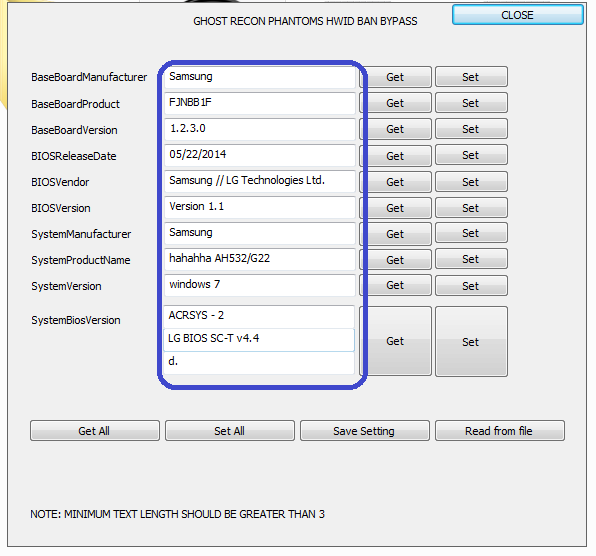
Ok so i have made new tool, this one is still not complete yet but it has manual way of changing the registry. So you can read the data and set a few changes the way you like.

I will add a few more options in later release which will include more options.
For now here it is.

I would Suggest making minor changes every time to your original setting. when ever you make a new account.

Picture:


VIRUS SCANS:
http://virusscan.jotti.org/de/scanre...e61f6203e9b81c
https://www.virustotal.com/en/file/8...is/1424641826/

GRPBanBypass_mpgh.net.zip182 KB · 2,399 downloads Clean
File appears safe but is untested, use at your own risk.
/Approved
It's working bro,

Thank you

Thank you very very much
mfc120u error......
You have to install.
Hello,

Try to install all of this in your PC. (necessarily drivers)

And no problems again.


Microsoft .NET Framework 4

Microsoft .NET Framework 4.5.2

Microsoft Visual C++ 2010 Redistributable Package (x86)

Microsoft Visual C++ 2010 Redistributable Package (x64)


Microsoft Visual C++ 2012 Redistributable Package (x86)

Microsoft Visual C++ 2012 Redistributable Package (x64)

Microsoft Visual C++ 2013 Redistributable Package (x86)

Microsoft Visual C++ 2013 Redistributable Package (x64)


DirectX (June 2010)


All this links from
Microsoft.


Java Version 8 Update 31 (x86)
or Java Version 8 Update 31 (x64)

Link from Java.com.
hey, do you know how to use it? or we just changing our bios stuff into random ?
Hi,

This is how I did it.

1- Run the "GRPBanBypass.exe" as Admin.


2- Click Get, All then save and move the saved file some where else.


3- Change every thing. example: your version is 1.2 change it to 1.2.1.


4- Click Set All, then save.


That's it.

Now go and create new account and play.
hey umm, mind if anyone give a tutorial?
not working same problem " this application was unable to start correctly 0xc00007b " and i'm setup directx - Visual C++ (vcredist) - java and not working, so you can't upload your visual C++ and directx + java in same folder ?
THANKS
Quote Originally Posted by realprox3 View Post
not working same problem " this application was unable to start correctly 0xc00007b " and i'm setup directx - Visual C++ (vcredist) - java and not working, so you can't upload your visual C++ and directx + java in same folder ?
THANKS
bro if you have manually installed mfc120.dll to your laptop deleted it first, Simply putting it in system32 or somewhere else wont work, you are not suppose to to that. after that install these things mentioned by YOUCEFHam in this post

http://www.mpgh.net/forum/showthread...1#post10235050

This will work.
Good!!! Senkya. (Sorry for my English).
Nice release , but you should improve the GUI a bit
Quote Originally Posted by timiostimio View Post
Nice release , but you should improve the GUI a bit
Sure why not, if you have ideas pm me. Or i will improve this one a little bit.
Quote Originally Posted by fire100 View Post
Sure why not, if you have ideas pm me. Or i will improve this one a little bit.
IMO, you shoud do some dropdown list with manufacturer list and Operating System list because they are "fixed".

Or if dropdown list isn't cool enough, why you don't let the user pick the Brand logo ?

You should try to find too wich of those can be let as is, because I'm pretty sure that UBI didn't take all informations, maybe just BaseBoardProduct is require to "unban" your computer (all the other options seem to be regulars information about computer's series and manufacturer's information)
Posts 115 of 146 · Page 1 of 10

Post a Reply

Similar Threads

Tags for this Thread

None

Need help?