I put my pendrive then it shows like this :
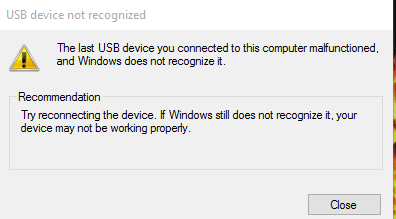
Tried most of method from the google but it kind a suck.. not working..
so, ur usb pot is broken. simple
Originally Posted by Ticherhaz
so, ur usb pot is broken. simple
sure? but on B computer I use A pendrive .. it work ...but not working at the A computer
i use B pendrive on A computer it also work ..but not working with A pendrive
A computer is the one that got problem with the A pendrive.
Originally Posted by Zeint
sure? but on B computer I use A pendrive .. it work ...but not working at the A computer
i use B pendrive on A computer it also work ..but not working with A pendrive
A computer is the one that got problem with the A pendrive.
A computer (plug usb) got problem ?
Originally Posted by Gixxer
what is your os?
windows 10.
Originally Posted by Ticherhaz
A computer (plug usb) got problem ?
nope. Tried with other usb .. it work.
Originally Posted by generator
check the drivers try to see if the usb is not malfunctioned otherwise return it
tried that. not malfunctioned. : as i said here :
Originally Posted by Zeint
sure? but on B computer I use A pendrive .. it work ...but not working at the A computer
i use B pendrive on A computer it also work ..but not working with A pendrive
A computer is the one that got problem with the A pendrive.
what is your os?
check the drivers try to see if the usb is not malfunctioned otherwise return it
Things that mite cause this:
USB Port,
USB Itself,
Windows 10/Drivers,
You.
Best bet is the USB Itself.
If you run windows 10
Click on windows in the bottom left corner, type Run and enter diskmgmt.msc to run Disk Management.
Sometimes you need to assign the drive letter to the device. See if it helps.
Otherwise it just could be a faulty USB. Have you tried to us it in a different computer? Even if you have access to Mac try there?
Originally Posted by Gixxer
If you run windows 10
Click on windows in the bottom left corner, type Run and enter diskmgmt.msc to run Disk Management.
Sometimes you need to assign the drive letter to the device. See if it helps.
Otherwise it just could be a faulty USB. Have you tried to us it in a different computer? Even if you have access to Mac try there?
yup already tried in different computer .. work on different computer
Originally Posted by Zeint
yup already tried in different computer .. work on different computer
It means that there is something fishy going on with your system. Try my method I described
Got the same problems since I got windows 10. Probably a driver problem.
Exact same problem sort of.
My USB mouses won't work but other USB devices work. I even tried 3 mouses and they work on a different laptop and I not your average user, I actually tried a-z tech support at home
- - - Updated - - -
PS windows 8.1 for me
- - - Updated - - -
Luckily this on my old laptop lol
1. Open Device Manager.
2. Expand the Universal Serial Bus controllers branch.
3. Double-click the USB Root Hub device, and click the Power Management tab. (if there’s more than one USB Root Hub device, repeat these steps for each one.)
4. Turn off the Allow the computer to turn off this device to save power option, and click OK button.