Changing rank DBD 3.0.0
Introduction
Unlike rank spoofing method introduced by @xoreaxeax (https://www.mpgh.net/forum/showthread.php?t=1444804) this method will actually change rank and after game restart your rank will still be changed without additional software.
General idea for advanced users
You should send a custom http request.
Method:
URL:
Headers:
Content:
Instead of "????" you should paste your current bhvrSession. Get in game, go to main menu and grab your cookie. Example:
Example of final request:
Sending this request once will give you 2 pips towards survivor and killer ranks. For example, if you are rank 1 Survivor, you have 85 pips. In order to get back to rank 10 (which is 41 pips) you should change content to
and send request 22 times. Restart your game after.
Method №1: Fiddler (hard)
1. Download and install latest version of Fiddler Web Debugging Proxy. Suggest using Telerik official website.
2. Log out of your Steam account.
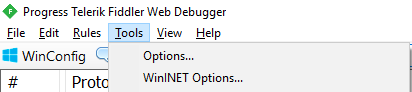
3. Launch Fiddler, at the top left corner click Tools - Options
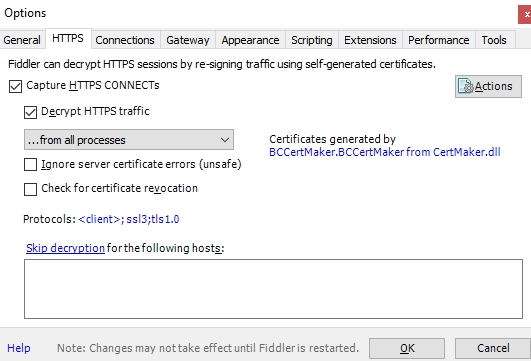
4. Go to HTTPS, Check "Capture HTTPS CONNECTs" and "Decrypt HTTPS traffic" boxes. If it's your first Fiddler usage it will ask you to install a certificate. As Fiddler accurately say, "This is generally safe" but i would recommend to do your own research before continuing.
5. Restart Fiddler.
6. Go to Composer>>Raw and paste this code:
Final result:
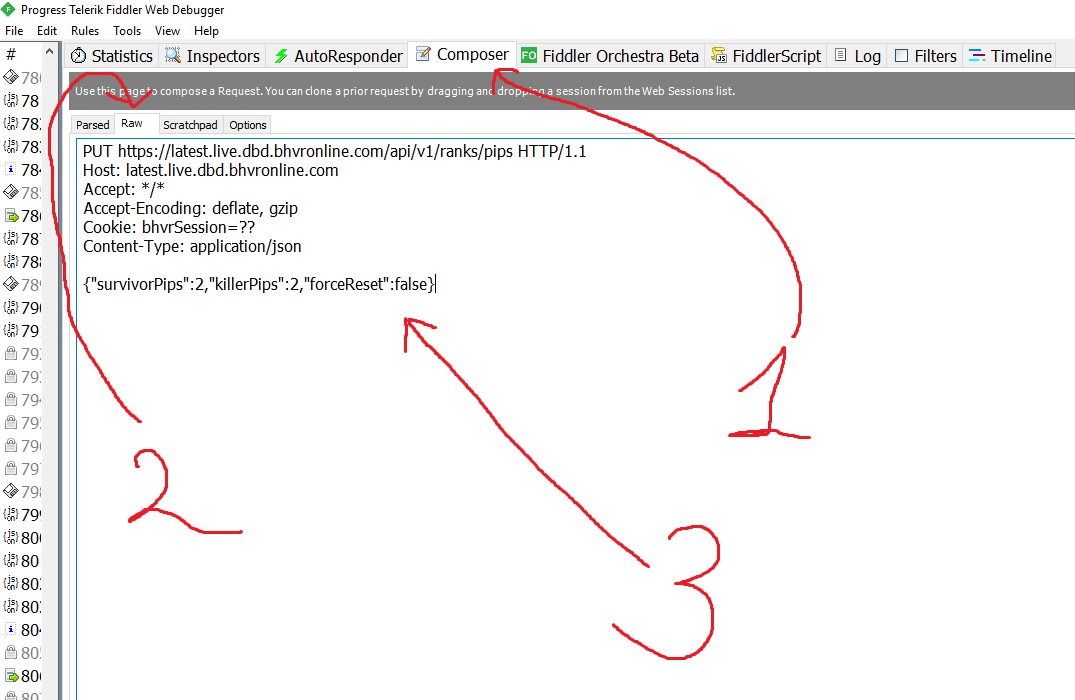
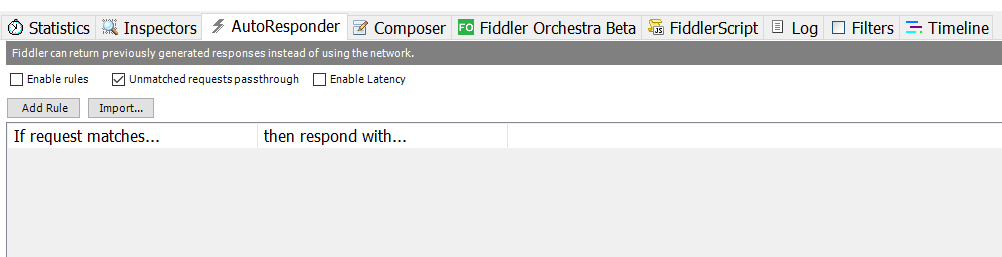
7. Instead of "??" you will have to paste your DBD session cookie. Go to AutoResponder and check "Unmatched requests passthrough" box.
8. Log in Steam, launch DBD and proceed to main menu.
9. Back to Fiddler, left Click "Host" Column
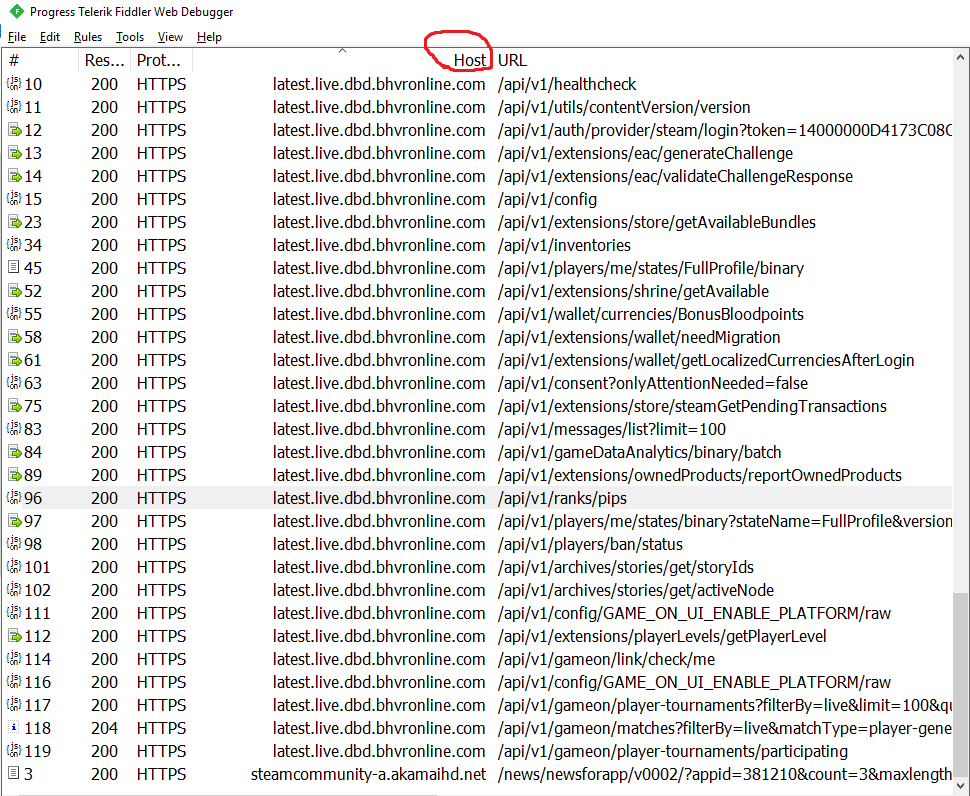
Double click any string from
"Inspectors" tab will appear. Navigate to "Cookies" and copy your "bhvrSession" after "="
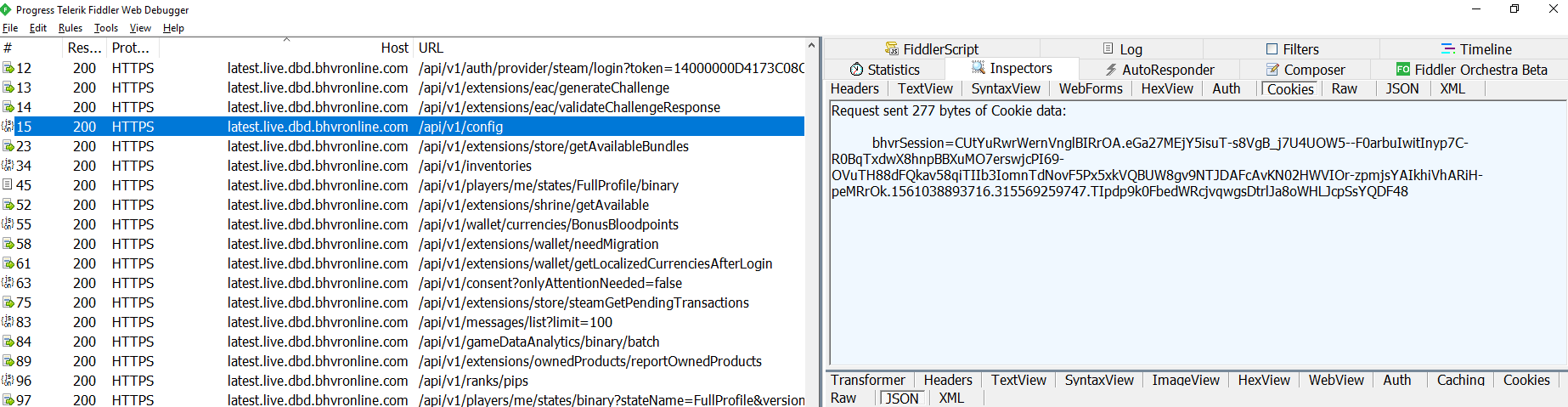
10. Go to Composer>>Raw and paste your Cookie instead of "??"

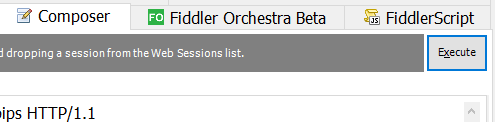
11. We have finished the setup. Open character selection screen in DBD, back to Fiddler, Composer, top right corner, hit Execute 3-4 times.
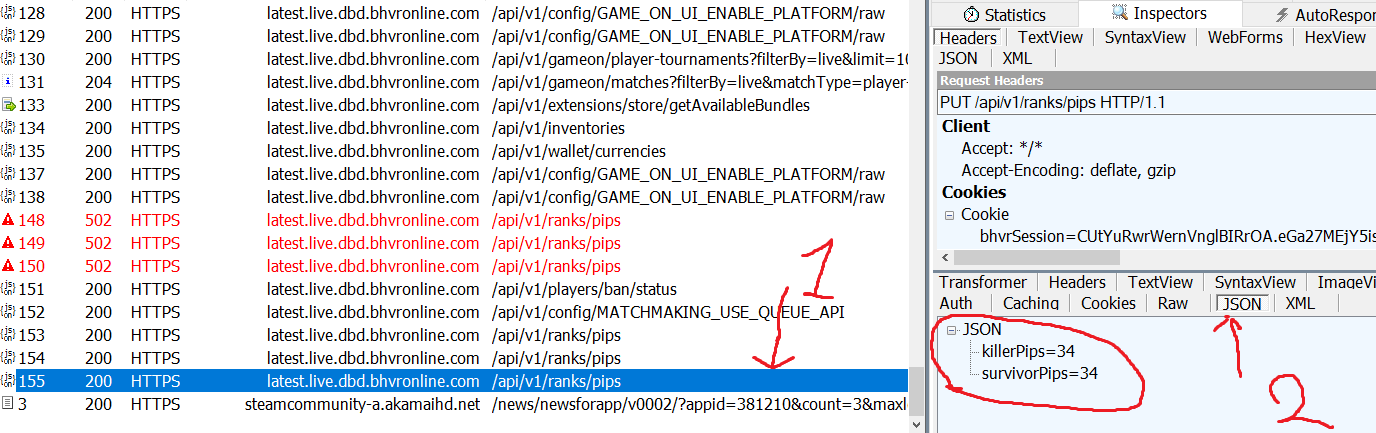
If previous steps done correctly, 3-4 new strings will appear in Fiddler.

Double click the bottom one. "Inspectors" tab will open, click "JSON" and it will show your current killer and survivors pips.
12. Each time you hit "Execute" you loose 2 pips on both sides. For example, if you are rank 1 Survivor, you have 85 pips. In order to get back to rank 10 (which is 41 pips) you should hit execute 22 times. Restart game to apply changes. If you want to rank up change your request from "-2" to "2".
Method №2: HTTP Debugger (hard)
1. Log out of your Steam account.
2. Download and install HTTP Debugger from their official website. Trial version is enough.
3. Launch Debugger, log in Steam, launch DBD and proceed to main menu.
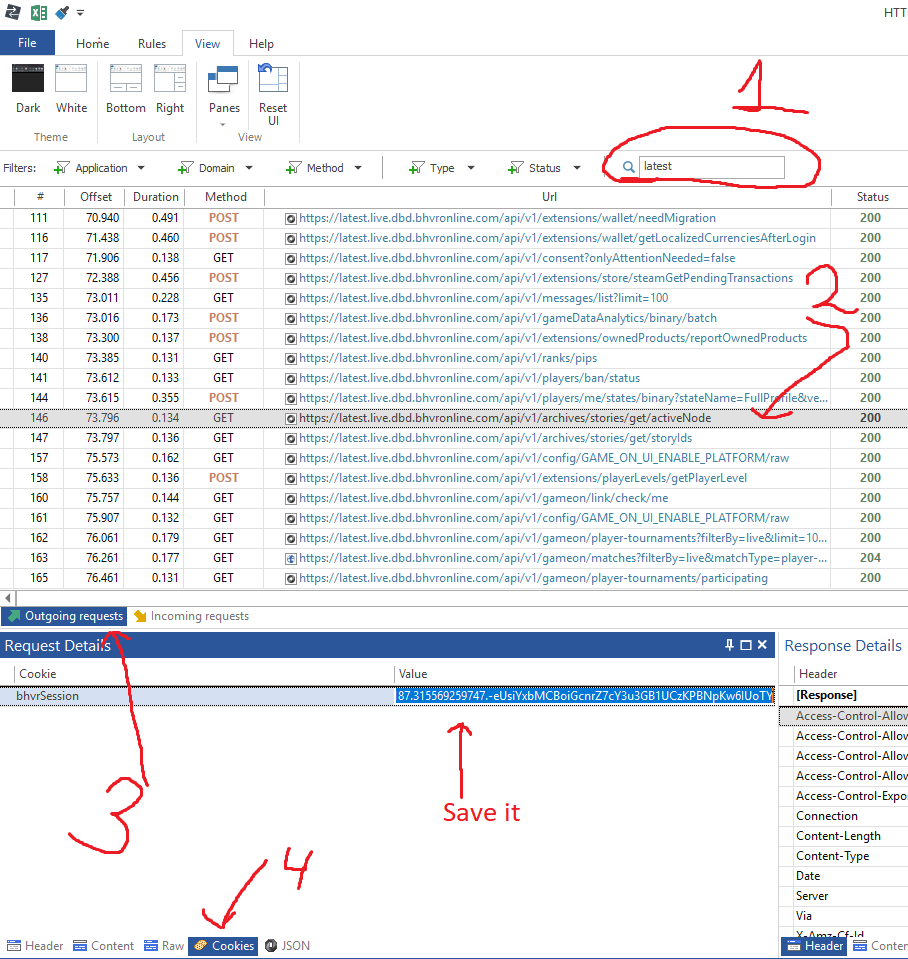
4. Type "latest" in Search, left click any string, go to "Outgoing requests", hit "Cookies" at the bottom and save your bhvrSession cookie.
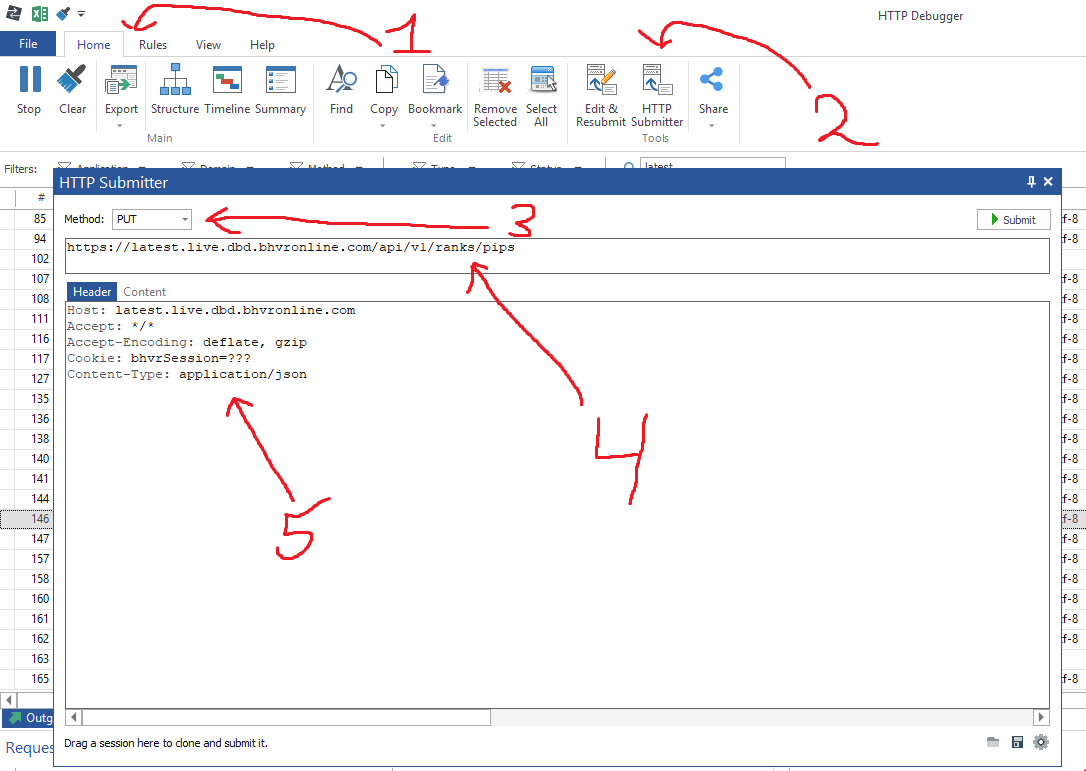
5. Go to Home>>HTTP Submitter. HTTP Submitter window will appear. Choose "PUT" Method, this code in the first string
This code under "Header"
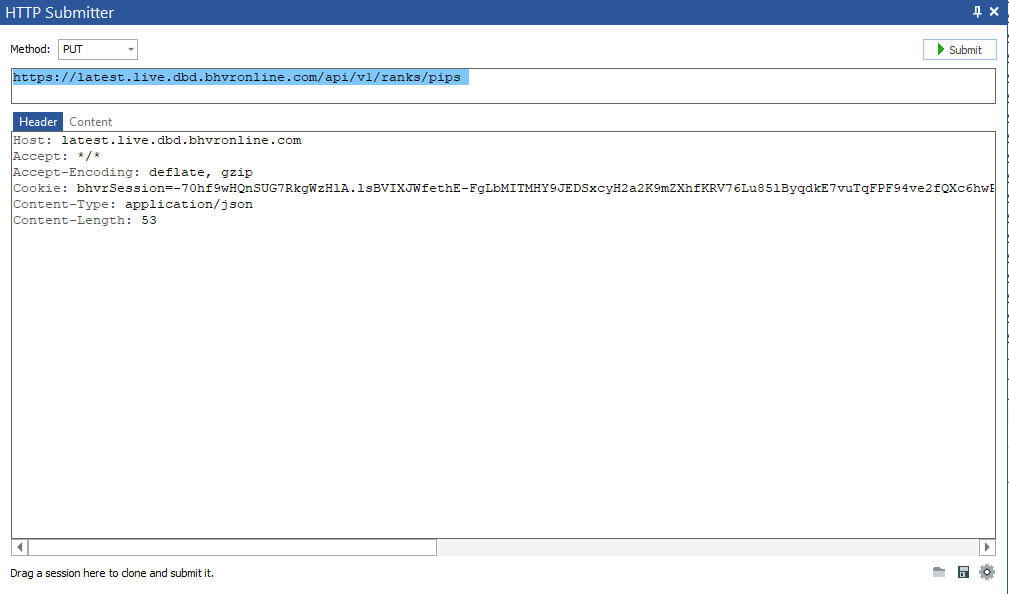
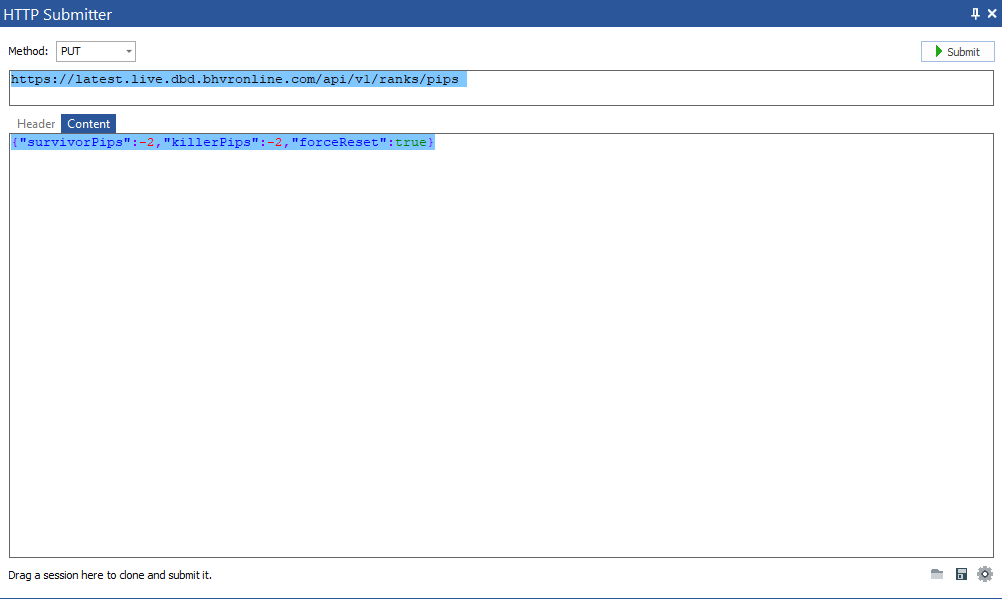
6. Paste your cookie instead of "??" and paste this code under "Content" tab.
Final result:
7. We have finished the setup. Open character selection screen in DBD, back to Debugger, hit Submit 3-4 times.

8. If previous steps done correctly, 3-4 new strings will appear in Debugger.

Left click the bottom one, go to "Outgoing requests", click "Content" and it will show your current killer and survivors pips under Response Details.
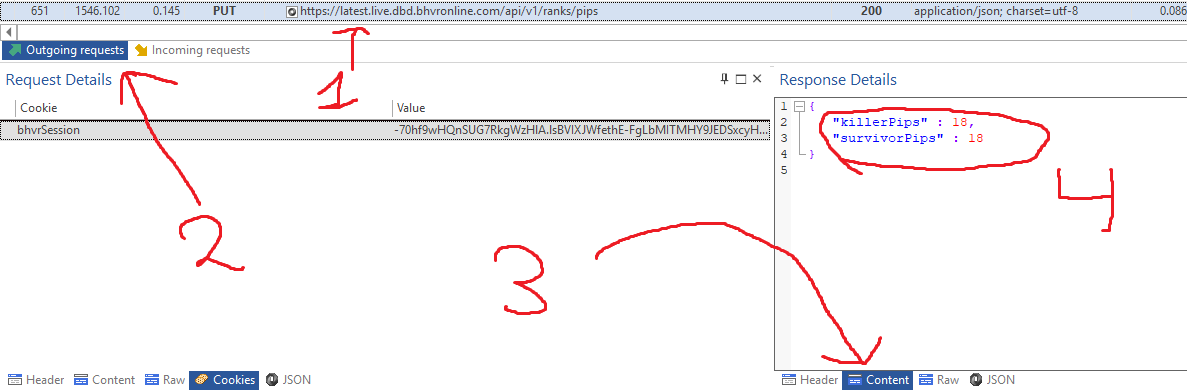
9. Each time you press "Submit" you loose 2 pips on both sides. For example, if you are rank 1 Survivor, you have 85 pips. In order to get back to rank 10 (which is 41 pips) you should press "Submit" 22 times. Restart game to apply changes. If you want to rank up change your request content from "-2" to"2".
Troubleshoot and Notes
1. DBD says i'm offline - Reinstall Fiddler certificate, launch Fiddler/Debugger as admin, disable AV, launch Fiddler/Debugger before launching Steam.
2.

You copied cookie incorrectly.
3.
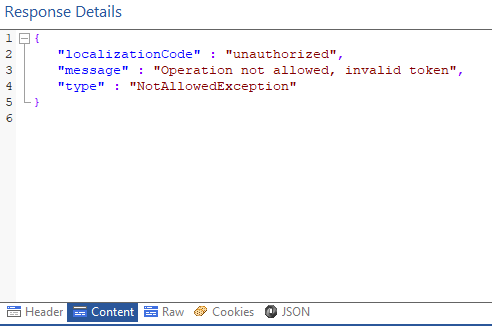
You copied cookie incorrectly.
4. "for some reason im not capturing any https traffic even though i switched it on" - Double check you correctly did an initial setup. Close Fiddler/Debugger. Disable your AV. Start Fiddler/Debugger as admin.
5.
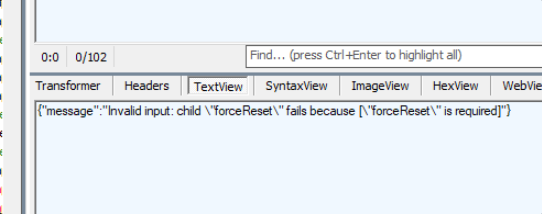
You copied code incorrectly.
Unlike rank spoofing method introduced by @xoreaxeax (https://www.mpgh.net/forum/showthread.php?t=1444804) this method will actually change rank and after game restart your rank will still be changed without additional software.
General idea for advanced users
You should send a custom http request.
Method:
Code:
PUT
Code:
https://latest.live.dbd.bhvronline.com/api/v1/ranks/pips
Code:
Host: latest.live.dbd.bhvronline.com
Accept: */*
Accept-Encoding: deflate, gzip
Cookie: bhvrSession=????
Content-Type: application/json
Code:
{"survivorPips":-2,"killerPips":-2,"forceReset":false}
Code:
bhvrSession=CHcdcGxUooIgnChkwKWAsg.L7f0RHL1YJLVP0Pvcj-8BBmxx9jtO9R7HwdIuu9e962P4nPrgXRxINWKL2Yx98Ny-EzdA36OMcbb74hTZu6SZui2B-kMQ34ayi5umJBfHgkFDaeWGk0ORVcfr2lNNNQju4_XMW4vDPCjXc29bxqaRAj_WuCxQ-ymwCrD7Zeq6PE.1561036740776.315569259747.cUcqthfJHDIi59A1Va_AC_FoOV4Wayw5dvifVvW81c8
Code:
PUT https://latest.live.dbd.bhvronline.com/api/v1/ranks/pips HTTP/1.1
Host: latest.live.dbd.bhvronline.com
Accept: */*
Accept-Encoding: deflate, gzip
Cookie: bhvrSession=CHcdcGxUooIgnChkwKWAsg.L7f0RHL1YJLVP0Pvcj-8BBmxx9jtO9R7HwdIuu9e962P4nPrgXRxINWKL2Yx98Ny-EzdA36OMcbb74hTZu6SZui2B-kMQ34ayi5umJBfHgkFDaeWGk0ORVcfr2lNNNQju4_XMW4vDPCjXc29bxqaRAj_WuCxQ-ymwCrD7Zeq6PE.1561036740776.315569259747.cUcqthfJHDIi59A1Va_AC_FoOV4Wayw5dvifVvW81c8
Content-Type: application/json

{"survivorPips":2,"killerPips":2,"forceReset":true}
Code:
{"survivorPips":-2,"killerPips":-2,"forceReset":true}
Method №1: Fiddler (hard)
1. Download and install latest version of Fiddler Web Debugging Proxy. Suggest using Telerik official website.
2. Log out of your Steam account.
3. Launch Fiddler, at the top left corner click Tools - Options
4. Go to HTTPS, Check "Capture HTTPS CONNECTs" and "Decrypt HTTPS traffic" boxes. If it's your first Fiddler usage it will ask you to install a certificate. As Fiddler accurately say, "This is generally safe" but i would recommend to do your own research before continuing.
5. Restart Fiddler.
6. Go to Composer>>Raw and paste this code:
Code:
PUT https://latest.live.dbd.bhvronline.com/api/v1/ranks/pips HTTP/1.1
Host: latest.live.dbd.bhvronline.com
Accept: */*
Accept-Encoding: deflate, gzip
Cookie: bhvrSession=??
Content-Type: application/json

{"survivorPips":-2,"killerPips":-2,"forceReset":false}
7. Instead of "??" you will have to paste your DBD session cookie. Go to AutoResponder and check "Unmatched requests passthrough" box.
8. Log in Steam, launch DBD and proceed to main menu.
9. Back to Fiddler, left Click "Host" Column
Double click any string from
Code:
latest.live.dbd.bhvronline.com
10. Go to Composer>>Raw and paste your Cookie instead of "??"
11. We have finished the setup. Open character selection screen in DBD, back to Fiddler, Composer, top right corner, hit Execute 3-4 times.
If previous steps done correctly, 3-4 new strings will appear in Fiddler.
Double click the bottom one. "Inspectors" tab will open, click "JSON" and it will show your current killer and survivors pips.
12. Each time you hit "Execute" you loose 2 pips on both sides. For example, if you are rank 1 Survivor, you have 85 pips. In order to get back to rank 10 (which is 41 pips) you should hit execute 22 times. Restart game to apply changes. If you want to rank up change your request from "-2" to "2".
Method №2: HTTP Debugger (hard)
1. Log out of your Steam account.
2. Download and install HTTP Debugger from their official website. Trial version is enough.
3. Launch Debugger, log in Steam, launch DBD and proceed to main menu.
4. Type "latest" in Search, left click any string, go to "Outgoing requests", hit "Cookies" at the bottom and save your bhvrSession cookie.
5. Go to Home>>HTTP Submitter. HTTP Submitter window will appear. Choose "PUT" Method, this code in the first string
Code:
https://latest.live.dbd.bhvronline.com/api/v1/ranks/pips
Code:
Host: latest.live.dbd.bhvronline.com
Accept: */*
Accept-Encoding: deflate, gzip
Cookie: bhvrSession=??
Content-Type: application/json
6. Paste your cookie instead of "??" and paste this code under "Content" tab.
Code:
{"survivorPips":-2,"killerPips":-2,"forceReset":true}
7. We have finished the setup. Open character selection screen in DBD, back to Debugger, hit Submit 3-4 times.
8. If previous steps done correctly, 3-4 new strings will appear in Debugger.
Left click the bottom one, go to "Outgoing requests", click "Content" and it will show your current killer and survivors pips under Response Details.
9. Each time you press "Submit" you loose 2 pips on both sides. For example, if you are rank 1 Survivor, you have 85 pips. In order to get back to rank 10 (which is 41 pips) you should press "Submit" 22 times. Restart game to apply changes. If you want to rank up change your request content from "-2" to"2".
Troubleshoot and Notes
1. DBD says i'm offline - Reinstall Fiddler certificate, launch Fiddler/Debugger as admin, disable AV, launch Fiddler/Debugger before launching Steam.
2.
You copied cookie incorrectly.
3.
You copied cookie incorrectly.
4. "for some reason im not capturing any https traffic even though i switched it on" - Double check you correctly did an initial setup. Close Fiddler/Debugger. Disable your AV. Start Fiddler/Debugger as admin.
5.
You copied code incorrectly.

 Originally Posted by crazyrzy