Changing player level DBD 3.0.1
Method №1: Fiddler (hard)
1. Download and install latest version of Fiddler Web Debugging Proxy. Suggest using Telerik official website.
2. Log out of your Steam account.
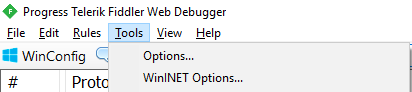
3. Launch Fiddler, at the top left corner click Tools - Options
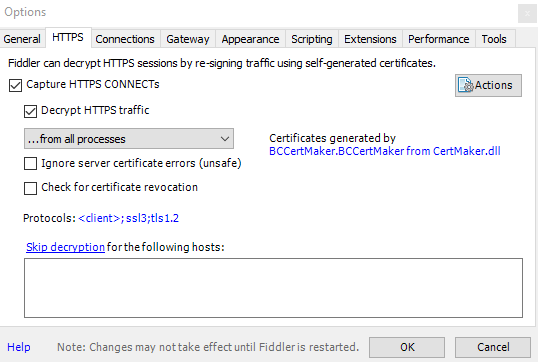
4. Go to HTTPS, Check "Capture HTTPS CONNECTs" and "Decrypt HTTPS traffic" boxes. If it's your first Fiddler usage it will ask you to install a certificate. As Fiddler accurately say, "This is generally safe" but i would recommend to do your own research before continuing. Under "Check for certificate revocation" locate "Protocols", left click blue text and paste this code:
5. Close Fiddler.
6. Log in Steam, launch DBD and proceed to main menu.
7. Go to C: \ Users\ **** \ AppData \ Local \ DeadByDaylight \ Saved \ Logs and open "DeadByDaylight.log" in notepad.

8. Press ctrl+F and type "api/v1/auth/provider/steam/login", choose Down Direction and click "Find Next".
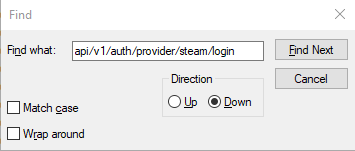
9. You will be redirected to this line:

Copy and save the whole URL. We will use it later. In my case it is:
10. Launch Fiddler, go to Composer>>Raw and paste this code:
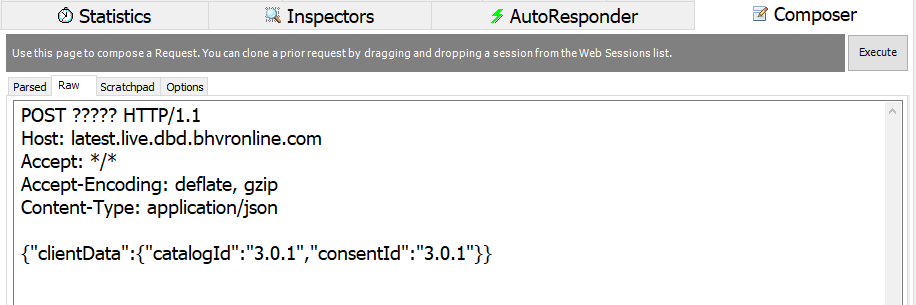
11. Instead of "????" you should paste your previously saved URL. Final result:
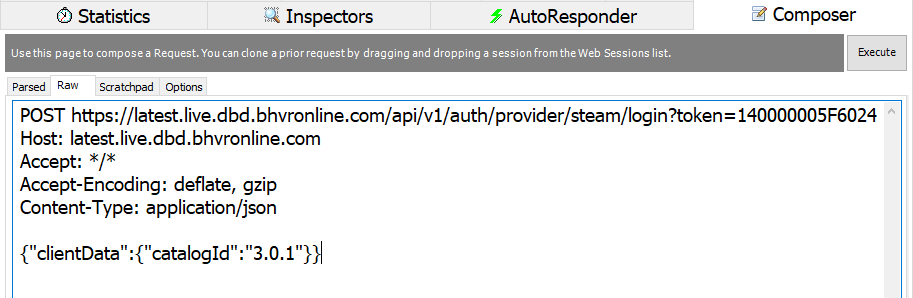

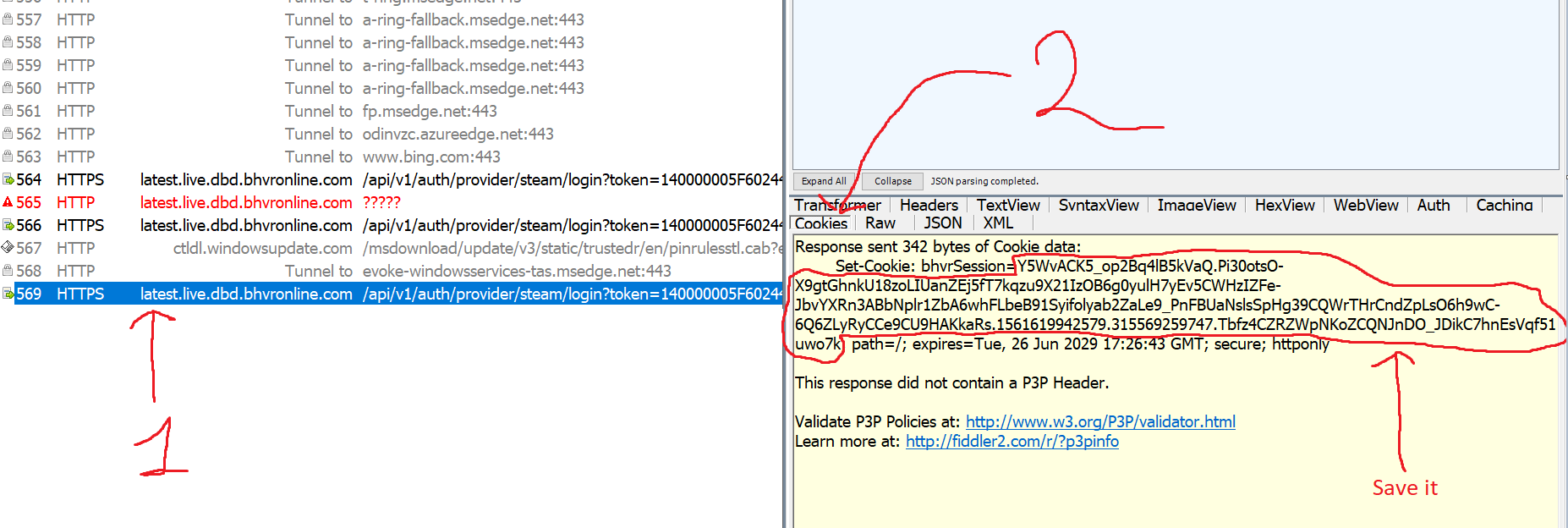
12. Press "Execute" once. If previous steps done correctly new line will appear. Double click it, "Inspectors" tab will appear, navigate to "Cookies", and copy your "bhvrSession" after "=" up to "; path=';".

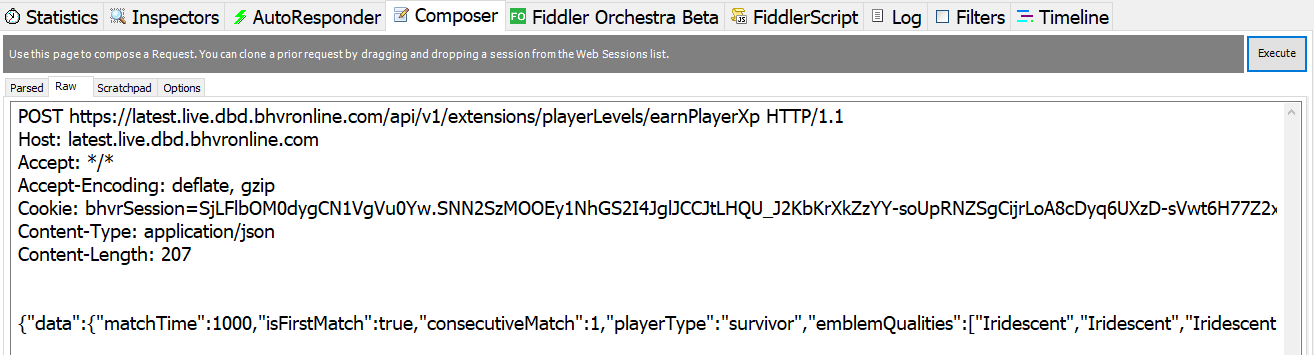
13. Go to Composer>>Raw and paste this code:
Final result:

14. Instead of "??" paste your DBD session cookie.
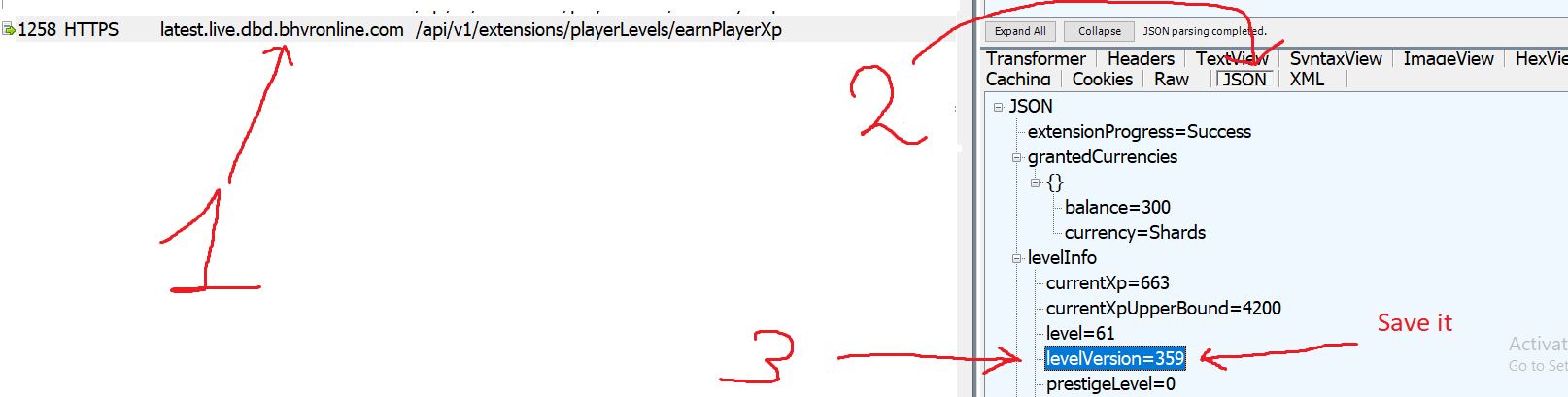
15. Press Execute once. New string will appear in Fiddler. Double click it. "Inspectors" tab will open, click "JSON" and it will show your current level information. Find "levelVersion=(number)" and copy this number.
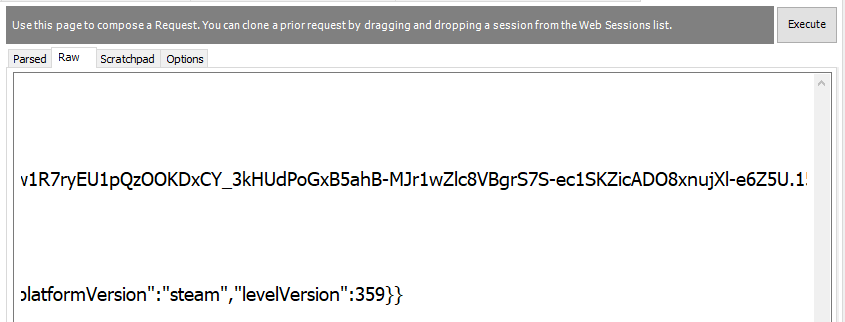
16. Go to Composer>>Raw, scroll to the right and paste copied instead of "1". Example:
17. Press Execute once more, new string will appear, double click it, go to Json. Notice that "currentXp" has increased by 901 and "levelVersion" by 1.
18. Enter new "levelVersion" in Composer. Each time you submit a request you gain 900 XP. Repeat the process until you reach desired player level (that might take some time ).
).
Method №2: HTTP Debugger (hard)
1. Download and install HTTP Debugger from their official website. Trial version is enough.
2. Close Debugger, log in Steam, launch DBD and proceed to main menu.
3. Go to C: \ Users\ **** \ AppData \ Local \ DeadByDaylight \ Saved \ Logs and open "DeadByDaylight.log" in notepad.
4. Press ctrl+F and type "api/v1/auth/provider/steam/login", choose Down Direction and click "Find Next".
5. You will be redirected to this line:
Copy and save the whole URL. We will use it later. In my case it is:
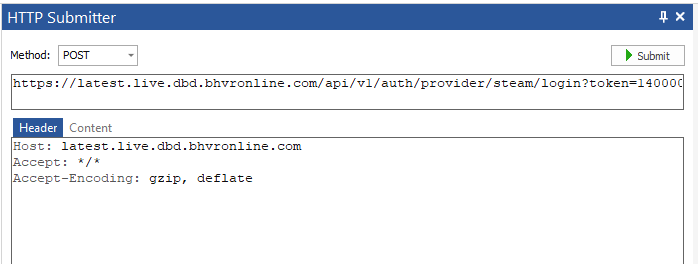
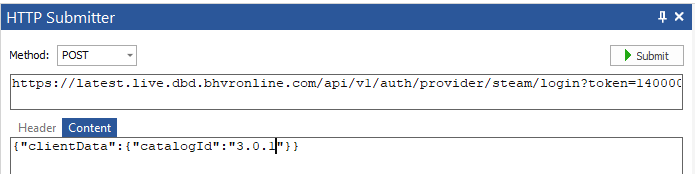
6. Launch Debugger, go to Home>>HTTP Submitter. HTTP Submitter window will appear. Choose "POST" method, paste your previously saved URL, first code under "Header" and second code in the Content tab.
7. Press "Submit" once. If previous steps done correctly new line will appear. Click it, go to "Outgoing requests">>Cookies and save your "bhvrSession" cookie.

8. Go to Home>>HTTP Submitter. Choose "POST" Method, this code in the first string
This code under "Header"
9. Paste your cookie instead of "??" and paste this code under "Content" tab.
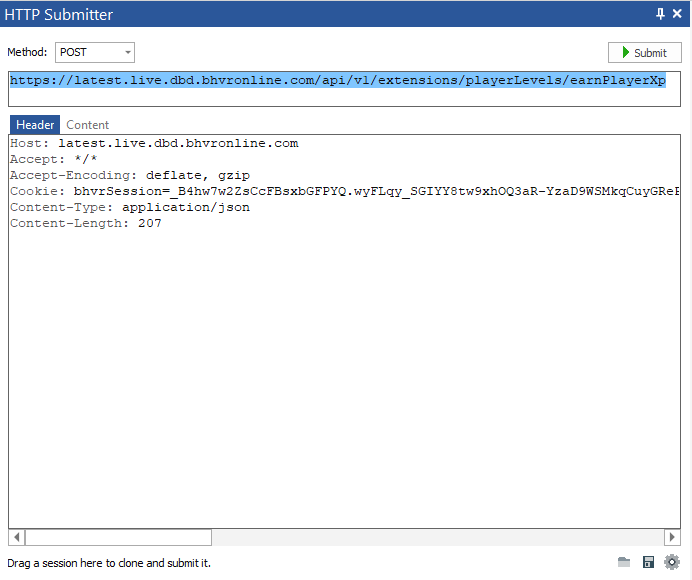
Final result:

10. Press Submit once.
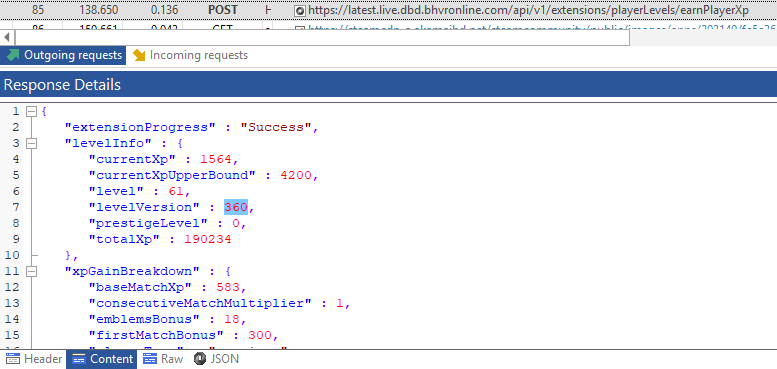
New string will appear in Debugger. Click it, go to "Outgoing requests", click "Content" and it will show your current level information. Find "levelVersion=(number)" and copy this number.
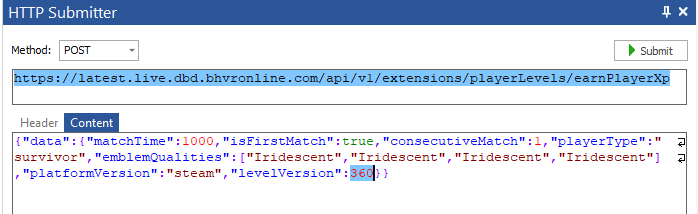
11. Go to Home>>HTTP Submitter>>Content and paste copied number instead of "1". Example:
12. Press Submit once more, new string will appear, click it, go to Content. Notice that "currentXp" has increased by 901 and "levelVersion" by 1.
13. Enter new "levelVersion" in HTTP Submitter Content. Each time you submit a request you gain 900 XP. Repeat the process until you reach desired player level.
Troubleshoot and Notes
1. Yes, you receive iridescent shards as well as experience.
2.

You copied cookie incorrectly.
3.
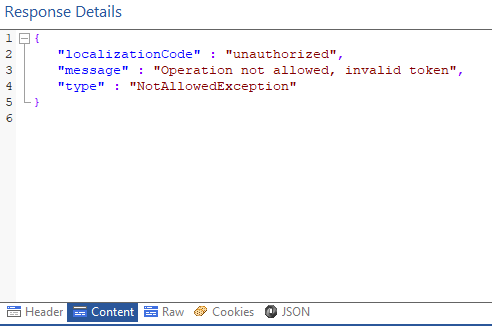
You copied cookie incorrectly.
4.
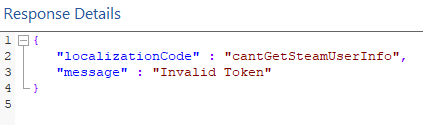
Restart DBD and take your token from log file again.
5.
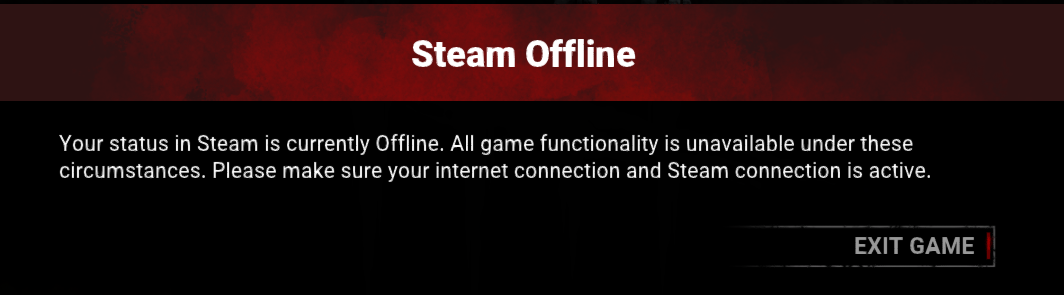
Close Fiddler/Debugger and restart DBD.
1. Download and install latest version of Fiddler Web Debugging Proxy. Suggest using Telerik official website.
2. Log out of your Steam account.
3. Launch Fiddler, at the top left corner click Tools - Options
4. Go to HTTPS, Check "Capture HTTPS CONNECTs" and "Decrypt HTTPS traffic" boxes. If it's your first Fiddler usage it will ask you to install a certificate. As Fiddler accurately say, "This is generally safe" but i would recommend to do your own research before continuing. Under "Check for certificate revocation" locate "Protocols", left click blue text and paste this code:
Code:
<client>;ssl3;tls1.2
5. Close Fiddler.
6. Log in Steam, launch DBD and proceed to main menu.
7. Go to C: \ Users\ **** \ AppData \ Local \ DeadByDaylight \ Saved \ Logs and open "DeadByDaylight.log" in notepad.
8. Press ctrl+F and type "api/v1/auth/provider/steam/login", choose Down Direction and click "Find Next".
9. You will be redirected to this line:
Copy and save the whole URL. We will use it later. In my case it is:
Code:
https://latest.live.dbd.bhvronline.com/api/v1/auth/provider/steam/login?token=14000000D581A05313F65361A1845912010010013F5F145D180000000100000002000000091E0FB000000000BB302A012C0000003C010000BC00000004000000A185912010010011AD10500091E0FB02901A8C0000000000CDC135D8C8B2F5D0100D88E01001700FC79070000006C820700000048830700000084C40700000085C407000000ACE207000000161908000000171908000000722608000000726080000008C75080000008D75080000006DD108000000C8E30800000036930900000078AF0A000007AAF0A0000002D730B000000E0310C00000036200E0000000ED40E0000009C680F0000009D680F000000030011A3DEAADFF0356073813009A1EDAD4540611138C73F7FA5D239DDCDBF4CE3AB6868C59F34D3B487E10985758A2D3C38498ADDCBC1BB2FA3667047AFC224B32735B5E5D0839A0AD57F39EB4BE23F108648F39F2419B2A9A39973E737137E71AF108CB7309511021DE33A41DE53D847FDDAA0C7A2C46872091C9DC98C013B51B0
Code:
POST ????? HTTP/1.1
Host: latest.live.dbd.bhvronline.com
Accept: */*
Accept-Encoding: deflate, gzip
Content-Type: application/json

{"clientData":{"catalogId":"3.0.1"}}
11. Instead of "????" you should paste your previously saved URL. Final result:
Code:
POST https://latest.live.dbd.bhvronline.com/api/v1/auth/provider/steam/login?token=140000005F60244A59168E0DA184591201001001F261145D180000000100000002000000091E0FB000000000BFFB44012E0000003C010000BC00000004000000A1845912010010011AD10500091E0FB02901A8C0000000000CDC135D8C8B2F5D0100D88E01001700FC79070000006C820700000048830700000084C40700000085C407000000ACE2070000001619080000001719080000007226080000007326080000008C75080000008D75080000006DD108000000C8E30800000036930900000078AF0A0000007AAF0A0000002D730B000000E0310C00000036200E0000000ED40E0000009C680F0000009D680F000000030011A3DEAADFF0356073813009A1EDAD4540611138C73F7FA5D239DDCDBF4CE3AB6868C59F34D3B487E10985758A2D3C38498ADDCBC1BB2FA3667047AFC224B32735B5E5D0839A0AD57F39EB4BE23F108648F39F2419B2A9A39973E737137E71AF108CB7309511021DE33A41DE53D847FDDAA0C7A2C46872091C9DC98C013B51B0 HTTP/1.1
Host: latest.live.dbd.bhvronline.com
Accept: */*
Accept-Encoding: deflate, gzip
Content-Type: application/json

{"clientData":{"catalogId":"3.0.1"}}
12. Press "Execute" once. If previous steps done correctly new line will appear. Double click it, "Inspectors" tab will appear, navigate to "Cookies", and copy your "bhvrSession" after "=" up to "; path=';".
13. Go to Composer>>Raw and paste this code:
Code:
POST https://latest.live.dbd.bhvronline.com/api/v1/extensions/playerLevels/earnPlayerXp HTTP/1.1
Host: latest.live.dbd.bhvronline.com
Accept: */*
Accept-Encoding: deflate, gzip
Cookie: bhvrSession=??
Content-Type: application/json
Content-Length: 207


{"data":{"matchTime":1000,"isFirstMatch":true,"consecutiveMatch":1,"playerType":"survivor","emblemQualities":["Iridescent","Iridescent","Iridescent","Iridescent"],"platformVersion":"steam","levelVersion":1}}
14. Instead of "??" paste your DBD session cookie.
15. Press Execute once. New string will appear in Fiddler. Double click it. "Inspectors" tab will open, click "JSON" and it will show your current level information. Find "levelVersion=(number)" and copy this number.
16. Go to Composer>>Raw, scroll to the right and paste copied instead of "1". Example:
17. Press Execute once more, new string will appear, double click it, go to Json. Notice that "currentXp" has increased by 901 and "levelVersion" by 1.
18. Enter new "levelVersion" in Composer. Each time you submit a request you gain 900 XP. Repeat the process until you reach desired player level (that might take some time
). Method №2: HTTP Debugger (hard)
1. Download and install HTTP Debugger from their official website. Trial version is enough.
2. Close Debugger, log in Steam, launch DBD and proceed to main menu.
3. Go to C: \ Users\ **** \ AppData \ Local \ DeadByDaylight \ Saved \ Logs and open "DeadByDaylight.log" in notepad.
4. Press ctrl+F and type "api/v1/auth/provider/steam/login", choose Down Direction and click "Find Next".
5. You will be redirected to this line:
Copy and save the whole URL. We will use it later. In my case it is:
Code:
https://latest.live.dbd.bhvronline.com/api/v1/auth/provider/steam/login?token=14000000D581A05313F65361A1845912010010013F5F145D180000000100000002000000091E0FB000000000BB302A012C0000003C010000BC00000004000000A185912010010011AD10500091E0FB02901A8C0000000000CDC135D8C8B2F5D0100D88E01001700FC79070000006C820700000048830700000084C40700000085C407000000ACE207000000161908000000171908000000722608000000726080000008C75080000008D75080000006DD108000000C8E30800000036930900000078AF0A000007AAF0A0000002D730B000000E0310C00000036200E0000000ED40E0000009C680F0000009D680F000000030011A3DEAADFF0356073813009A1EDAD4540611138C73F7FA5D239DDCDBF4CE3AB6868C59F34D3B487E10985758A2D3C38498ADDCBC1BB2FA3667047AFC224B32735B5E5D0839A0AD57F39EB4BE23F108648F39F2419B2A9A39973E737137E71AF108CB7309511021DE33A41DE53D847FDDAA0C7A2C46872091C9DC98C013B51B0
Code:
Host: latest.live.dbd.bhvronline.com
Accept: */*
Accept-Encoding: gzip, deflate
Content-Length: 62
Code:
{"clientData":{"catalogId":"3.0.1"}}
7. Press "Submit" once. If previous steps done correctly new line will appear. Click it, go to "Outgoing requests">>Cookies and save your "bhvrSession" cookie.
8. Go to Home>>HTTP Submitter. Choose "POST" Method, this code in the first string
Code:
https://latest.live.dbd.bhvronline.com/api/v1/extensions/playerLevels/earnPlayerXp
Code:
Host: latest.live.dbd.bhvronline.com
Accept: */*
Accept-Encoding: deflate, gzip
Cookie: bhvrSession=???
Content-Type: application/json
Content-Length: 207
9. Paste your cookie instead of "??" and paste this code under "Content" tab.
Code:
{"data":{"matchTime":1000,"isFirstMatch":true,"consecutiveMatch":1,"playerType":"survivor","emblemQualities":["Iridescent","Iridescent","Iridescent","Iridescent"],"platformVersion":"steam","levelVersion":1}}
10. Press Submit once.
New string will appear in Debugger. Click it, go to "Outgoing requests", click "Content" and it will show your current level information. Find "levelVersion=(number)" and copy this number.
11. Go to Home>>HTTP Submitter>>Content and paste copied number instead of "1". Example:
12. Press Submit once more, new string will appear, click it, go to Content. Notice that "currentXp" has increased by 901 and "levelVersion" by 1.
13. Enter new "levelVersion" in HTTP Submitter Content. Each time you submit a request you gain 900 XP. Repeat the process until you reach desired player level.
Troubleshoot and Notes
1. Yes, you receive iridescent shards as well as experience.
2.
You copied cookie incorrectly.
3.
You copied cookie incorrectly.
4.
Restart DBD and take your token from log file again.
5.
Close Fiddler/Debugger and restart DBD.
 Originally Posted by logicdn

