[Tutorial] Decrease Ping! Guranteed Work!
Tired of lagging? Well its your lucky day, follow this guide, and say Bye bye to lag! I decreased my ping with almost 30%!
For this we gotta edit the registry, watch carefully. If anything goes wrong in your registry your PC may CRASH.
NOTE: If you have Vista, you need to have Service Pack 1 installed. Without it will have no work.
1. Go to your start menu > run > type regedit > ok

2. Browse to
HKEY_LOCAL_MACHINE\SYSTEM\CurrentControlSet\servic es\Tcpip\Parameters\Interfaces
3. Browse the folders under Interfaces. Look in all of them, until you find DefaultGateway, which should be 192.xxx.xxx.xxx (x = whatever)
4. If you find the correct one, right click on an empty spot, and select New > DWORD (if 64-bit it needs to be QWORD)
5. A window should pop-up, now do the following:
(CASE-SENSITIVE, SO NOT: tcpackfrequency but TcpAckFrequency)
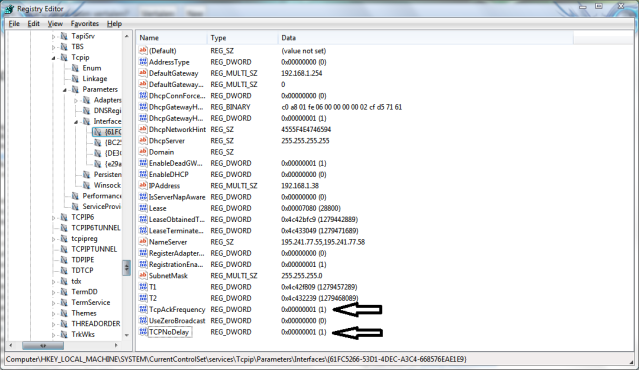
Name: TcpAckFrequency
Value: 1 <Hexadecimal>
Press Ok
Do step 4 again, but now:
Name: TCPNoDelay
Value: 1 <Hexadecimal>
Press Ok
6. If you have done it correctly it should look like this:
7. Close the registry editor, and restart your PC.
8. Go in any game and check out your ping!
Check out my connection now!

IF I HELPED YOU, DONT FORGET TO SAY THANKS!
For this we gotta edit the registry, watch carefully. If anything goes wrong in your registry your PC may CRASH.
NOTE: If you have Vista, you need to have Service Pack 1 installed. Without it will have no work.
1. Go to your start menu > run > type regedit > ok
2. Browse to
HKEY_LOCAL_MACHINE\SYSTEM\CurrentControlSet\servic es\Tcpip\Parameters\Interfaces
3. Browse the folders under Interfaces. Look in all of them, until you find DefaultGateway, which should be 192.xxx.xxx.xxx (x = whatever)
4. If you find the correct one, right click on an empty spot, and select New > DWORD (if 64-bit it needs to be QWORD)
5. A window should pop-up, now do the following:
(CASE-SENSITIVE, SO NOT: tcpackfrequency but TcpAckFrequency)
Name: TcpAckFrequency
Value: 1 <Hexadecimal>
Press Ok
Do step 4 again, but now:
Name: TCPNoDelay
Value: 1 <Hexadecimal>
Press Ok
6. If you have done it correctly it should look like this:
7. Close the registry editor, and restart your PC.
8. Go in any game and check out your ping!
Check out my connection now!
IF I HELPED YOU, DONT FORGET TO SAY THANKS!
 Originally Posted by Insane


 thanks...
 I'm going to download a few files now and see if they get corrupt.