How To Use One Button For [OFF] & [ON] - C#
Seeing that nearly every one posting in the release section is using two buttons, one for ON the other for OFF... Well time you learn how to use one button...
Here is the GUI
Before

After

Hmm you must be thinking this must be very easy!
Correct!
Here is how you do it...
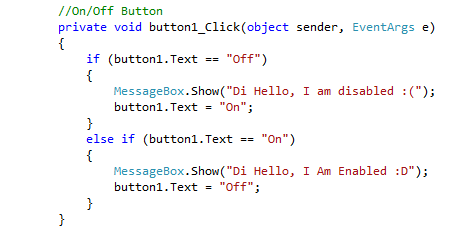
What would happen if you changed the "else if" to "if"...
Well you would get both MessageBoxe's showing from just clicking once
Some of you may be saying.. hey I know another way!
Good on ya, then use it!
This is a simple way and what I use
I hope to see in all of the people that needed this to see it used in your next release
---
Q: Why is it an image?
A: Yuno type yo self? y u wona copy n paste? yuno learn? reading will help you understand it, that's why you copy crap from the board at school
Here is the GUI
Before
After
Hmm you must be thinking this must be very easy!
Correct!
Here is how you do it...
What would happen if you changed the "else if" to "if"...
Well you would get both MessageBoxe's showing
from just clicking onceSome of you may be saying.. hey I know another way!
Good on ya, then use it!
This is a simple way and what I use
I hope to see in all of the people that needed this to see it used in your next release
---
Q: Why is it an image?
A: Yuno type yo self? y u wona copy n paste? yuno learn? reading will help you understand it, that's why you copy crap from the board at school
 Originally Posted by Kenshin13


 he
he