[Tutorial] Task Manager
Easy Task Manager
You can add this to any existing app, or use it as a standalone app
In either case, it doesn't hurt to know how to do this
and it's a lot easier then everyone may think
Your Column Collection should look something like this
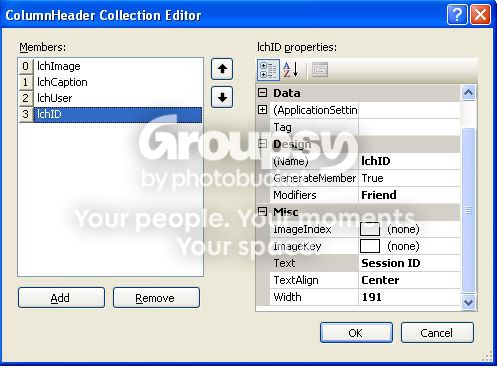
'Note: You can set a timer to auto refresh, if you want to , let me know and I will add it it to the post.
The appearence of your project should look something like this (give or take )
)
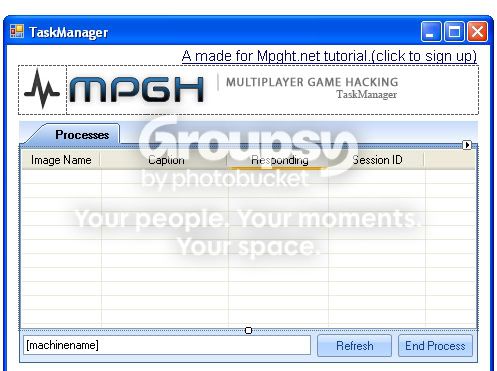
Code : (here is the code you need to make it work, I will try and note as much as possible so you know what is going on)
That should be everything, run it and test it, if I left out something or you would like to know more about a Task Manager , Pm me, or post your questions here
Screenshot of final product
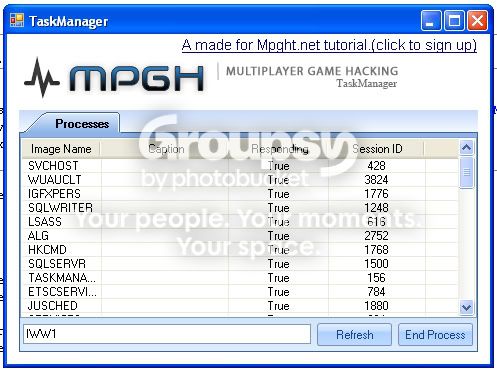
Virus Scan For Source
Virus Scan For Sample
Download Source Code Example
Download Sample
Hope this helps someone.
Note: Yes I just realized the linklabel says mpght.net it should be mpgh.net, however, it's a clickable link that takes you to mpgh.net
Note: You may need to make minor changes depending on your controls and it's names
You can add this to any existing app, or use it as a standalone app
In either case, it doesn't hurt to know how to do this
and it's a lot easier then everyone may think
- Create a new VB.net project.
- Add a Tab Control to your form (you should dock it full, I didn't for asthetic reasons)
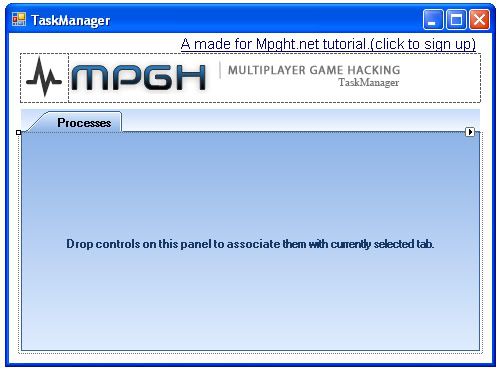
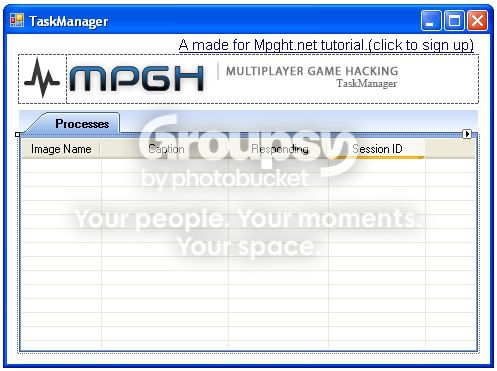
- Add A list view inside the tab and set dock to top (leaving room for some buttons and a textbox
(in the below image it is docked full, remember to dock Top
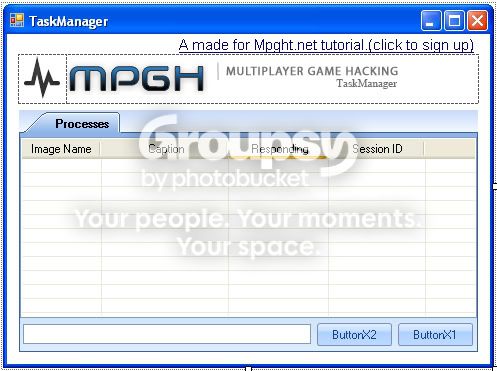
- Add 2 buttons
- Add a textbox
Should look like this
- Click your listviewbox and click Items - Collection
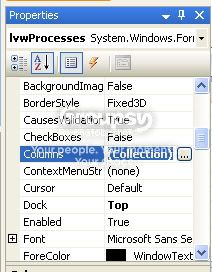
- Add these items with the following settings for each
Code:
--------------------------
Name: ichimage
Modifier: Friend
Text: Imagename
Width: 100

Name: ichcaption
Modifier: Friend
Text: Caption
Width: 200

Name: ichuser
Modifier: Friend
Text: Responding
Width: 100

Name: ichid
Modifier: Friend
Text: SessionID
Width: 100

---------------------------------
- Set the text for your buttons to , Refresh and End Process
'Note: You can set a timer to auto refresh, if you want to , let me know and I will add it it to the post.
- Set the text of the textbox to "[machinename]" without quotes (keep brackets)
The appearence of your project should look something like this (give or take
)Code : (here is the code you need to make it work, I will try and note as much as possible so you know what is going on)
Code:
' Description:This code is used in making a working taskmanager
' By: NextGen1 of Mpgh.net
' This code is copyrighted and comes  with no warranties.
' This code is intended for demonstration and all rights are granted soley to mpgh.net and it's members
' If you require any further information please contact me at mpgh.net via PM (Get an account if you don't have one)
' Tutorials and apps create by me for mpgh.net will contain the following agreement
' By adding this code in whole or part to any existing or new application you agree to the following terms
' You agree to keep these notes connected with this code.
' You agree to grant credit to it's source (Mpgh.net)
' You agree to keep this note in whole without edit inside of your code

'Required Namespaces , allows us to check system diagnostics including Task, Processes, Cpu, Memory, Etc.
Imports System
Imports System.Diagnostics
Public Class Form1
' Asthetics
Inherits System.Windows.Forms.Form


    Private Sub Form1_Load(ByVal sender As System.Object, ByVal e As System.EventArgs) Handles MyBase.Load
'Sets the textbox to the machinename
TextBox1.Text = System.Environment.MachineName.ToString
'Fills the list with running processes
Call FillList(TextBox1.Text)
    End Sub

' Gets running processes
Sub FillList(ByVal MachineName As String)
        Dim Prc() As Process
        Dim i As Integer
        Dim lvwP As ListViewItem
        Try
            lvwProcesses.Items.Clear()
            Prc = Process.GetProcesses(MachineName)

            For i = 0 To UBound(Prc)
                lvwP = lvwProcesses.Items.Add(Prc(i).ProcessName.ToUpper)

                If MachineName <> System.Environment.MachineName Then
                    lvwP.SubItems.Add("Unavailable...")
                    lvwP.SubItems.Add("Unavailable...")
                    lvwP.SubItems.Add(Prc(i).Id)
                Else
                    lvwP.SubItems.Add(Prc(i).MainWindowTitle)
                    lvwP.SubItems.Add(Prc(i).Responding)
                    lvwP.SubItems.Add(Prc(i).Id)
                End If

            Next
        Catch
            lvwProcesses.Items.Add("Error enumerating items...")
        End Try
    End Sub

    Private Sub ButtonX1_Click(ByVal sender As System.Object, ByVal e As System.EventArgs) Handles ButtonX1.Click
        Dim Prc As Process

        If TextBox1.Text = System.Environment.MachineName.ToString Then
            Try
                Prc = Process.GetProcessById(lvwProcesses.SelectedItems(0).SubItems(3).Text)
                Prc.Kill()
                lvwProcesses.Items.Remove(lvwProcesses.SelectedItems.Item(0))
            Catch
                MessageBox.Show("Could not close process, " & Err.Description, "Error:", MessageBoxButtons.OK, MessageBoxIcon.Stop)
            End Try
        Else
            MessageBox.Show("You cannot close processes on a remote machine, only view them!", "Error:", MessageBoxButtons.OK, MessageBoxIcon.Exclamation)
        End If
    End Sub

    Private Sub ButtonX2_Click(ByVal sender As System.Object, ByVal e As System.EventArgs) Handles ButtonX2.Click
        TextBox1.Text = TextBox1.Text.ToUpper
        Call FillList(TextBox1.Text)
    End Sub
End Class
Screenshot of final product
Virus Scan For Source
Virus Scan For Sample
Download Source Code Example
Download Sample
Hope this helps someone.
Note: Yes I just realized the linklabel says mpght.net it should be mpgh.net, however, it's a clickable link that takes you to mpgh.net
Note: You may need to make minor changes depending on your controls and it's names
 .
. But I has one already.
 Originally Posted by Bombsaway707

