[TUT]finding the device pointer
I DID NTO MAKE THIS I FOUND IT AND AM POSTING IT HERE, all credits go to MRE521 the creater
 Originally Posted by i eat trees

Originally Posted by i eat trees
Ok, first off you need a Debugger(OllyDbg), and a D3D8 game(I use Soldat). You can use a D3D9 Game too because the concept is the same.
First thing you must do is open the game in OllyDbg(Soldat is packed so when it asks you to analyze select no):

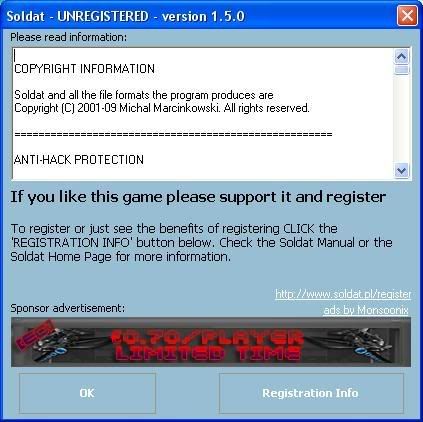
Next thing to do is let the game run(f9) because before it initializes D3D it pops up a registration window:
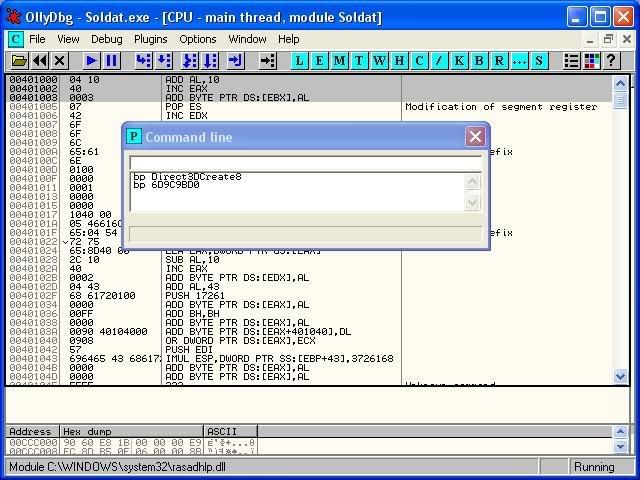
Now, to find the Direct3D8 Interface you have to set a breakpoint on Direct3DCreate8(or 9 if you are using D3D9). Do this by going to the menu "Plugins->2 Command line->Command line" and typing in the window "bp Direct3DCreate8":
One you have done that, Click "OK" on the Soldat window.
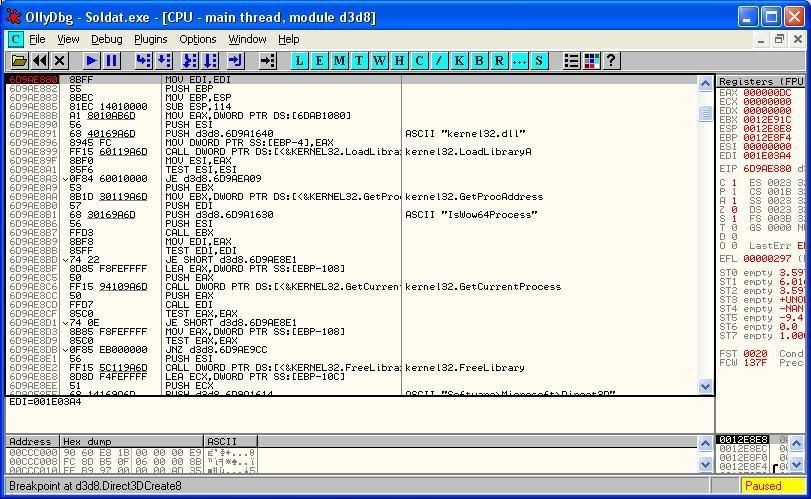
After a second or two, OllyDbg should break on some code which is the Direct3DCreate8 function in d3d8.dll:
To find out where this was called from we now must press Ctrl+f9 which will execute code until the next "ret" instruction:
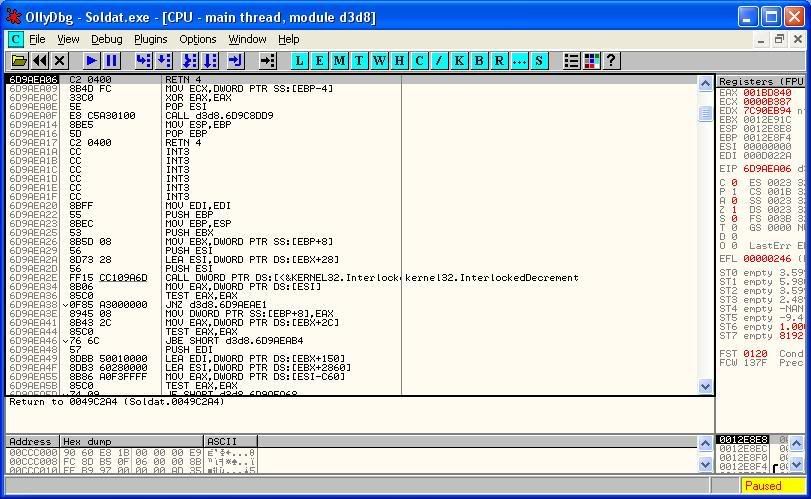
Now press f7 and you should see the call to the function one instruction up:
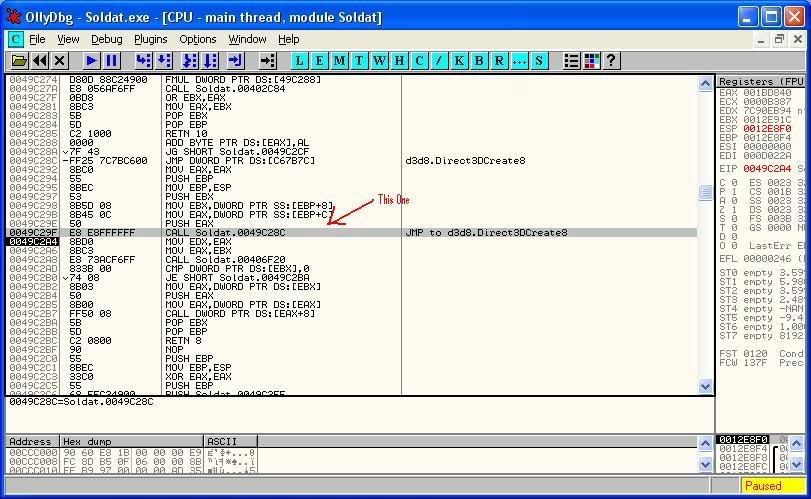
To find the function IDirect3D->CreateDevice, which we need to find the device pointer, I will explain what the code after the call to Direct3DCreate8 Does.
The code is code that calls a function from IDirect3D8 interface. The two movs at the top just move values around the regsters and are not what we are looking for. The first call seems to be a call to a game function to check if Direct3D Initialized successfully; This is also not what we are looking for. The cmp and je instructions make the exectution pointer jump somewhere id D3D did not init properly. Still not what we want but the next part is. The instruction "MOV EAX,DWORD PTR DS:[EBX]" is the exact same as doing this in c/c++: "eax = *ebx;". Its dereferencing a pointer. In this case its dereferencing the IDirect3D8 pointer in ebx. We are getting closer to finding createdevice. The next instruction, "push eax", just pushes eax on to the stack because then "pop eax" can just be used instead of 2 movs because that "MOV EAX,DWORD PTR DS:[EBX]" is needed to call IDirect3D8 functions. Now we see "MOV EAX,DWORD PTR DS:[EAX]" which dereferences eax because ebx contained a pointer to a pointer. The second pointer is the pointer to the IDirect3D8 function address table. To find any IDirect3D8 function with the value in eax, all you need to do is do "MOV EAX,DWORD PTR DS:[EAX+FUNCTIONINDEX]", FUNCTIONINDEX being the index of the IDirect3D8 function in the table. Now, the next and last instruction of interest here is "CALL DWORD PTR DS:[EAX+8]" which is instead of "MOV EAX,DWORD PTR DS:[EAX+FUNCTIONINDEX]" because it doesn't store the function address, it just directly calls it. The compiler could have put this: "MOV EAX,DWORD PTR DS:[EAX+8] CALL EAX" which would have done the same thing. Now that you know what all this means(hopefully) lets find CreateDevice.
All you need to do to find CreateDevice is replace "CALL DWORD PTR DS:[EAX+8]" with "MOV EAX,DWORD PTR DS:[EAX+3C]". We do this because the index of CreateDevice is 3C in hex. This instruction will put the address of CreateDevice in EAX which is useful. Once that is done press f7 until Olly executes our modified instruction:
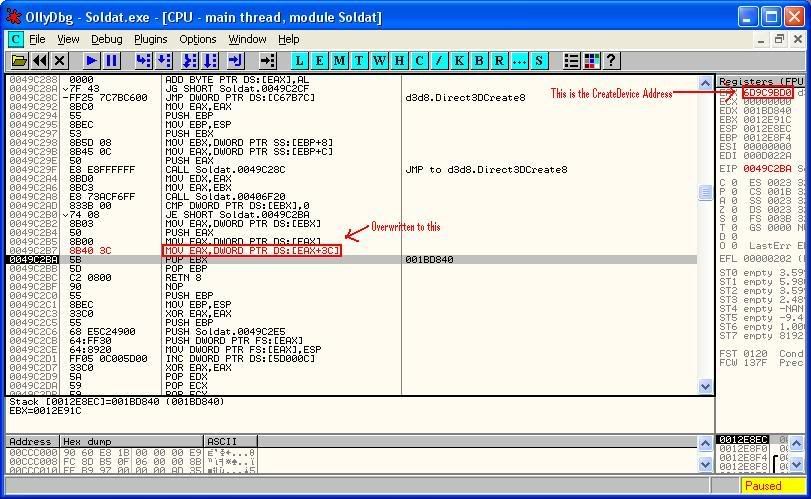
Now, write down that address and restart the game by pressing Ctrl+f2.
Set a breakpoint on Direct3DCreate8 Again and run the game until it breaks there.
Once it breaks on Direct3DCreate8, set a Breakpoint on the CreateDevice Address Yet again.
Run the game again(f9)
Press Ctrl-f9 then f7 to find out where CreateDevice was called from.
Now you should see one instruction up a "CALL DWORD PTR DS:[EAX+3c]" which is almost how we found Create device:
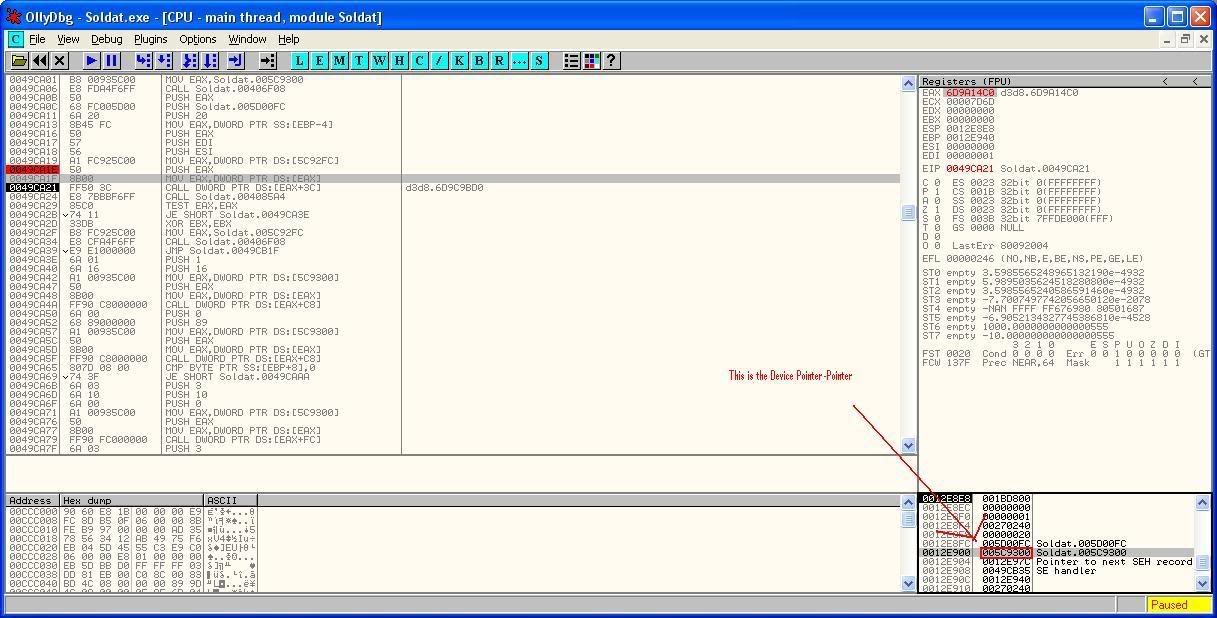
This is what we want.
HRESULT CreateDevice(
UINT Adapter,
D3DDEVTYPE DeviceType,
HWND hFocusWindow,
DWORD BehaviorFlags,
D3DPRESENT_PARAMETERS * pPresentationParameters,
IDirect3DDevice8 ** ppReturnedDeviceInterface
);
The last argument you can see is the device pointer-pointer.
To find it all we have to do is restart the game again(Ctrl-f2), Set a breakpoint on Direct3DCreate8. When that breaks set a breakpoint on the "CALL DWORD PTR DS:[EAX+3c]" we see here(remember it's address). When it breaks on "CALL DWORD PTR DS:[EAX+3c]" press f7 and whatever address is says on the stack right above the words "Pointer to next SEH record" is the device pointer-pointer:
To find the Device Pointer(Not Pointer-Pointer) just use the pointer dereferencing operator in c/c++.
What we found here is the address in which the game always stores the device pointer. Now you can just read this value, test if it is greater than 0, if it is then hook D3D Device functions like EndScene(I will not explain this here).
Here is text dumps i have from olly:
I hope this helped someone and if you don't know what Soldat is then search it in Google.
First thing you must do is open the game in OllyDbg(Soldat is packed so when it asks you to analyze select no):
Next thing to do is let the game run(f9) because before it initializes D3D it pops up a registration window:
Now, to find the Direct3D8 Interface you have to set a breakpoint on Direct3DCreate8(or 9 if you are using D3D9). Do this by going to the menu "Plugins->2 Command line->Command line" and typing in the window "bp Direct3DCreate8":
One you have done that, Click "OK" on the Soldat window.
After a second or two, OllyDbg should break on some code which is the Direct3DCreate8 function in d3d8.dll:
To find out where this was called from we now must press Ctrl+f9 which will execute code until the next "ret" instruction:
Now press f7 and you should see the call to the function one instruction up:
To find the function IDirect3D->CreateDevice, which we need to find the device pointer, I will explain what the code after the call to Direct3DCreate8 Does.
The code is code that calls a function from IDirect3D8 interface. The two movs at the top just move values around the regsters and are not what we are looking for. The first call seems to be a call to a game function to check if Direct3D Initialized successfully; This is also not what we are looking for. The cmp and je instructions make the exectution pointer jump somewhere id D3D did not init properly. Still not what we want but the next part is. The instruction "MOV EAX,DWORD PTR DS:[EBX]" is the exact same as doing this in c/c++: "eax = *ebx;". Its dereferencing a pointer. In this case its dereferencing the IDirect3D8 pointer in ebx. We are getting closer to finding createdevice. The next instruction, "push eax", just pushes eax on to the stack because then "pop eax" can just be used instead of 2 movs because that "MOV EAX,DWORD PTR DS:[EBX]" is needed to call IDirect3D8 functions. Now we see "MOV EAX,DWORD PTR DS:[EAX]" which dereferences eax because ebx contained a pointer to a pointer. The second pointer is the pointer to the IDirect3D8 function address table. To find any IDirect3D8 function with the value in eax, all you need to do is do "MOV EAX,DWORD PTR DS:[EAX+FUNCTIONINDEX]", FUNCTIONINDEX being the index of the IDirect3D8 function in the table. Now, the next and last instruction of interest here is "CALL DWORD PTR DS:[EAX+8]" which is instead of "MOV EAX,DWORD PTR DS:[EAX+FUNCTIONINDEX]" because it doesn't store the function address, it just directly calls it. The compiler could have put this: "MOV EAX,DWORD PTR DS:[EAX+8] CALL EAX" which would have done the same thing. Now that you know what all this means(hopefully) lets find CreateDevice.
All you need to do to find CreateDevice is replace "CALL DWORD PTR DS:[EAX+8]" with "MOV EAX,DWORD PTR DS:[EAX+3C]". We do this because the index of CreateDevice is 3C in hex. This instruction will put the address of CreateDevice in EAX which is useful. Once that is done press f7 until Olly executes our modified instruction:
Now, write down that address and restart the game by pressing Ctrl+f2.
Set a breakpoint on Direct3DCreate8 Again and run the game until it breaks there.
Once it breaks on Direct3DCreate8, set a Breakpoint on the CreateDevice Address Yet again.
Run the game again(f9)
Press Ctrl-f9 then f7 to find out where CreateDevice was called from.
Now you should see one instruction up a "CALL DWORD PTR DS:[EAX+3c]" which is almost how we found Create device:
This is what we want.
HRESULT CreateDevice(
UINT Adapter,
D3DDEVTYPE DeviceType,
HWND hFocusWindow,
DWORD BehaviorFlags,
D3DPRESENT_PARAMETERS * pPresentationParameters,
IDirect3DDevice8 ** ppReturnedDeviceInterface
);
The last argument you can see is the device pointer-pointer.
To find it all we have to do is restart the game again(Ctrl-f2), Set a breakpoint on Direct3DCreate8. When that breaks set a breakpoint on the "CALL DWORD PTR DS:[EAX+3c]" we see here(remember it's address). When it breaks on "CALL DWORD PTR DS:[EAX+3c]" press f7 and whatever address is says on the stack right above the words "Pointer to next SEH record" is the device pointer-pointer:
To find the Device Pointer(Not Pointer-Pointer) just use the pointer dereferencing operator in c/c++.
What we found here is the address in which the game always stores the device pointer. Now you can just read this value, test if it is greater than 0, if it is then hook D3D Device functions like EndScene(I will not explain this here).
Here is text dumps i have from olly:
Code:
DISASSEMBLY
-----------

0049CA0B   50               PUSH EAX
0049CA0C   68 FC005D00      PUSH Soldat.005D00FC
0049CA11   6A 20            PUSH 20
0049CA13   8B45 FC          MOV EAX,DWORD PTR SS:[EBP-4]
0049CA16   50               PUSH EAX
0049CA17   57               PUSH EDI
0049CA18   56               PUSH ESI
0049CA19   A1 FC925C00      MOV EAX,DWORD PTR DS:[5C92FC]
0049CA1E   50               PUSH EAX
0049CA1F   8B00             MOV EAX,DWORD PTR DS:[EAX]
0049CA21   FF50 3C          CALL DWORD PTR DS:[EAX+3C]               ; d3d8.6D9C9BD0(CreateDevice)


STACK AT 0049CA1F(CreateDevice Argument List)
-----------------

0012E8EC   00000000		    	               \ (Adapter)
0012E8F0   00000001		     	                | (DeviceType)
0012E8F4   0011038E		     	                | (hFocusWindow)
0012E8F8   00000020		     	                | (BehaviorFlags)
0012E8FC   005D00FC  Soldat.005D00FC 	| (pPresentationParameters)
0012E900   005C9300  Soldat.005C9300      / (ppReturnedDeviceInterface)***
#1 ·