A17 Assembly Information Sheet

Posts 1–15 of 27 · Page 1 of 2
A17 Assembly Information Sheet
A list of modification locations for A17 that is mostly accurate.

Code:
PATCH TYPES:
  FALSE:
    Delete all & append:
      ldc.i4.0
      ret
  TRUE:
    Delete all & append:
      ldc.i4.1
      ret
  ZERO:
    Delete all & append:
      ldc.r4 : operand of 0
      ret
  ONE:
    Delete all & append:
      ldc.r4 : operand of 1
      ret
  SINGLE:
    Delete all & append:
      ldc.r4 : operand of 99999
      ret
  RETURN:
    Delete all & append:
      ret

Get achievements whilst in creative mode:
    Location: -/AchievementUtils/IsCreativeModeActive(): Boolean
    Type: FALSE
Disable damage received from blocks (such as cacti):
    Location: -/BlockDamage/OnEntityCollidedWithBlock(WorldBase, Int32, Vector3i, BlockValue, Entity): Boolean
    Type: FALSE
Disable mines from detonating when stepped on:
    Location: -/BlockMine/OnEntityWalking(WorldBase, Int32, Int32, Int32, BlockValue, Entity): Void
    Type: RETURN
Disable tripwire activation:
    Location: -/BlockTripWire/OnBlockActivated(Int32, WorldBase, Int32, Vector3i, BlockValue, EntityAlive): Boolean
    Type: FALSE
Disable radiation sensitivity:
    Location: -/EntityAlive/isRadiationSensitive(): Boolean
    Type: FALSE
    Notes:
      Affects zombies/animals in singleplayer.
Display all players on the map:
    Location: -/EntityPlayer/IsDrawMapIcon(): Boolean
    Type: TRUE
Disable backpack drop upon death or quit:
    Location: -/EntityPlayerLocal/dropBackpack(Boolean): Void
    Type: RETURN
Disable fall damage:
    Location: -/EntityPlayerLocal/FallImpact(Single): Void
    Type: RETURN
Change player map icon color:
    Location -/EntityPlayerLocal/GetMapIconColor(): Color
    Type: CUSTOM
      Change the operand for the method call at line 0 from UnityEngine.Color::get_White() to any other color's get_<Color>() method inside the UnityEngine.Color class.
    Notes:
      The all the colors are properties in the UnityEngine.Color class, so they will need to be expanded in order to see the .get_<Color>() method.
      It is also possible to create a custom RGB color instead of using a present. See the Unity Color.Color docs.
Disable drowning:
    Location: -/EntityPlayerLocal/isHeadUnderwater(Single): Boolean
    Type: FALSE
Disable recoil:
    Location: -/EntityPlayerLocal/OnFired(): Void
    Type: RETURN
Enable Universal Owner (Vehicles; Part 1):
    Location: -/EntityVehicle/IsOwner(String): Boolean
    Type: TRUE
Enable Universal Owner (Vehicles; Part 2):
    Location: -/EntityVehicle/IsUserAllowed(String): Boolean
    Type: TRUE
Enable creative and debug menus:
    Location: -/GameManager/<startGameCo>c__Iterator1/MoveNext(): bool
    Type: CUSTOM
      Replace lines 127-129 (ldarg.0, ldfld, ldfld) with ldc.i4.1.
      Change line 132 from ldc.i4.0 to ldc.i4.1.
    Notes:
      The <startGameCo>c__Iterator1 nested class is not displayed in ILSpy unless the decompiler language is set to IL or IL with C#.
Enable console commands:
    Location: -/GUIWindowConsole/EnterCommand(): Void
    Type: CUSTOM
      Change line 28 (brtrue) to brfalse
    Notes: 
      The brtrue is the one after Steam::get_Network() and NetworkCommon::get_IsClient() calls.
      Changing this without an additional/different check will cause console commands to error whilst in singleplayer.
Enable instant crafting repair:
    Location: -/ItemActionEntryRepair/OnActivated(): Void
    Type: CUSTOM
      Change line 119 (ldloc.s->var 10) to ldc.i4.0.
    Notes:
      Located right after a virtual call to DataItem`1/get_Value() and right before a conversion to float32 (conv.r4). Look right above a reference to Recipe::craftingTime (stfld). 
Enable instant scrapping:
    Location: -/ItemActionEntryScrap/OnActivated(): Void
    Type: CUSTOM
      Change line 135 (ldloc.s->var 10) to ldc.i4.0.
    Notes:
      Located right after a refrence to ItemClass:CraftComponentTime (ldfld) and right before a conversion to float32 (conv.r4). Look right above a reference to Recipe::craftingTime (stfld).
Disable ammunition consumption:
    Location: -/ItemActionRanged/ConsumeAmmo(ItemActionData): Void
    Type: RETURN
Display all players on the compass:
    Location: -/MapObject/IsOnCompass(): Boolean
    Type: TRUE
    Notes:
      Untested for A17. May have additional/alternative effects.
Display all player homes on the map:
    Location: -/MapObjectSleepingBag/IsOnCompass(): Boolean
    Type: TRUE
    Notes:
      This doesn't appear to be working correctly for A17-b240.
Enable instant looting:
    Location: -/TileEntityLootContainer/GetOpenTime(): Single
    Type: ZERO
Enable Universal Owner (TileEntities)
    Locations:  -/TileEntityPoweredRangedTrap/IsOwner(String): Boolean
                -/TileEntityPoweredTrigger/IsOwner(String): Boolean
                -/TileEntityPowerSource/IsOwner(String): Boolean
                -/TileEntitySecure/IsOwner(String): Boolean
                -/TileEntitySecure/IsUserAllowed(String): Boolean
                -/TileEntitySecureLootContainer/IsOwner(String): Boolean
                -/TileEntitySecureLootContainer/IsUserAllowed(String): Boolean
                -/TileEntitySign/IsOwner(String): Boolean
                -/TileEntitySign/IsUserAllowed(String): Boolean
                -/TileEntityVendingMachine/IsOwner(String): Boolean
                -/TileEntityVendingMachine/IsUserAllowed(String): Boolean
    Type: TRUE
Disable trader force teleport:
    Location: -/TraderArea/IsWithinTeleportArea(Vector3i): Boolean
    Type: FALSE
Disable player land protection:
    Location: -/World/GetLandProtectionHardnessModifier(Vector3i, EntityAlive, PersistentPlayerData): Single
    Type: ONE
Disable trader land protection:
    Location: -/World/IsWithinTraderArea(Vector3i): Boolean
    Type: FALSE
    Notes:
      Affects zombies/animals in singleplayer.
Enable instant crafting:
    Location: -/XUiM_Recipes/GetRecipeCraftTime(XUi, Recipe): Single
Best,
Sqeegie
Quote Originally Posted by THaeztdHtehthth View Post
Can you give us the extreme damage too?
I honestly don't like this method, 'til why I didn't include it. It's too. . . unrefined for my tastes. However, if you want to use it, here you go:

Code:
Crappy extreme damage:
    Location: -/ItemActionAttack/Hit(World, WorldRayHitInfo, Int32, EnumDamageTypes, Single, Single, Single, Single, Single, Single, Single, String, DamageMultiplier, List<String>, AttackHitInfo, Int32, Single, ItemActionAttack, Dictionary<String, Bonuses>, EnumAttackMode, Boolean): Void
    Type: CUSTOM!!!!
      At the top of the method, add the following (do not delete anything!):
	ldarg.0
	ldarg.2
	callvirt  // method reference to WorldBase.GetEntity(System.Int32)
	isinst    // type reference to EntityPlayerLocal
	brfalse.s // instruction reference to ldarg.1 on line 0005 (current, line 0013 finished)
	ldarg.s   // parameter reference to #4 _blockDamage(System.Single)
	ldc.r4    // single with the value of 99999 (or whatever)
	add
	starg.s   // parameter reference to #4 _blockDamage(System.Single)
	ldarg.s   // parameter reference to #5 _entityDamage(System.Single)
	ldc.r4    // single with the value of 99999 (or whatever)
	add
	starg.s   // parameter reference to #5 _entityDamage(System.Single)
If you're looking to ever add keybinds to this, after the first brfalse.s, just add a call to your isEnabled method/field and create another brfalse.s that's an exact duplicate of the first after it.

Best,
Sqeegie
Quote Originally Posted by Sqeegie View Post
I honestly don't like this method, 'til why I didn't include it. It's too. . . unrefined for my tastes. However, if you want to use it, here you go:

Code:
Crappy extreme damage:
    Location: -/ItemActionAttack/Hit(World, WorldRayHitInfo, Int32, EnumDamageTypes, Single, Single, Single, Single, Single, Single, Single, String, DamageMultiplier, List<String>, AttackHitInfo, Int32, Single, ItemActionAttack, Dictionary<String, Bonuses>, EnumAttackMode, Boolean): Void
    Type: CUSTOM!!!!
      At the top of the method, add the following (do not delete anything!):
	ldarg.0
	ldarg.2
	callvirt  // method reference to WorldBase.GetEntity(System.Int32)
	isinst    // type reference to EntityPlayerLocal
	brfalse.s // instruction reference to ldarg.1 on line 0005 (current, line 0013 finished)
	ldarg.s   // parameter reference to #4 _blockDamage(System.Single)
	ldc.r4    // single with the value of 99999 (or whatever)
	add
	starg.s   // parameter reference to #4 _blockDamage(System.Single)
	ldarg.s   // parameter reference to #5 _entityDamage(System.Single)
	ldc.r4    // single with the value of 99999 (or whatever)
	add
	starg.s   // parameter reference to #5 _entityDamage(System.Single)
If you're looking to ever add keybinds to this, after the first brfalse.s, just add a call to your isEnabled method/field and create another brfalse.s that's an exact duplicate of the first after it.

Best,
Sqeegie
Dear Sqeegie, I cannot figure out how to disable ammo consumption, All I found was where it was located, Can you help me change it?

EDIT: I quoted the wrong post ._.
b9 Assembly Information Sheet
You have b9 Assembly Information Sheet ?
Quote Originally Posted by Julia Oliveira View Post
You have b9 Assembly Information Sheet ?
It should be almost the exactly the same, if not the same, for build 9 as for any other version of A17/A17.1. No major changes occur during patch updates, so everything should still be approximately the same. The main thing that might change is the line numbers for certain modifications, but the actual location should remain the same.

To answer your question, no, I do not have a specific A17.1-b9 assembly information sheet.

Best,
Sqeegie
Quote Originally Posted by Sqeegie View Post
A list of modification locations for A17 that is mostly accurate.

Code:
PATCH TYPES:
  FALSE:
    Delete all & append:
      ldc.i4.0
      ret
  TRUE:
    Delete all & append:
      ldc.i4.1
      ret
  ZERO:
    Delete all & append:
      ldc.r4 : operand of 0
      ret
  ONE:
    Delete all & append:
      ldc.r4 : operand of 1
      ret
  SINGLE:
    Delete all & append:
      ldc.r4 : operand of 99999
      ret
  RETURN:
    Delete all & append:
      ret

Get achievements whilst in creative mode:
    Location: -/AchievementUtils/IsCreativeModeActive(): Boolean
    Type: FALSE
Disable damage received from blocks (such as cacti):
    Location: -/BlockDamage/OnEntityCollidedWithBlock(WorldBase, Int32, Vector3i, BlockValue, Entity): Boolean
    Type: FALSE
Disable mines from detonating when stepped on:
    Location: -/BlockMine/OnEntityWalking(WorldBase, Int32, Int32, Int32, BlockValue, Entity): Void
    Type: RETURN
Disable tripwire activation:
    Location: -/BlockTripWire/OnBlockActivated(Int32, WorldBase, Int32, Vector3i, BlockValue, EntityAlive): Boolean
    Type: FALSE
Disable radiation sensitivity:
    Location: -/EntityAlive/isRadiationSensitive(): Boolean
    Type: FALSE
    Notes:
      Affects zombies/animals in singleplayer.
Display all players on the map:
    Location: -/EntityPlayer/IsDrawMapIcon(): Boolean
    Type: TRUE
Disable backpack drop upon death or quit:
    Location: -/EntityPlayerLocal/dropBackpack(Boolean): Void
    Type: RETURN
Disable fall damage:
    Location: -/EntityPlayerLocal/FallImpact(Single): Void
    Type: RETURN
Change player map icon color:
    Location -/EntityPlayerLocal/GetMapIconColor(): Color
    Type: CUSTOM
      Change the operand for the method call at line 0 from UnityEngine.Color::get_White() to any other color's get_<Color>() method inside the UnityEngine.Color class.
    Notes:
      The all the colors are properties in the UnityEngine.Color class, so they will need to be expanded in order to see the .get_<Color>() method.
      It is also possible to create a custom RGB color instead of using a present. See the Unity Color.Color docs.
Disable drowning:
    Location: -/EntityPlayerLocal/isHeadUnderwater(Single): Boolean
    Type: FALSE
Disable recoil:
    Location: -/EntityPlayerLocal/OnFired(): Void
    Type: RETURN
Enable Universal Owner (Vehicles; Part 1):
    Location: -/EntityVehicle/IsOwner(String): Boolean
    Type: TRUE
Enable Universal Owner (Vehicles; Part 2):
    Location: -/EntityVehicle/IsUserAllowed(String): Boolean
    Type: TRUE
Enable creative and debug menus:
    Location: -/GameManager/<startGameCo>c__Iterator1/MoveNext(): bool
    Type: CUSTOM
      Replace lines 127-129 (ldarg.0, ldfld, ldfld) with ldc.i4.1.
      Change line 132 from ldc.i4.0 to ldc.i4.1.
    Notes:
      The <startGameCo>c__Iterator1 nested class is not displayed in ILSpy unless the decompiler language is set to IL or IL with C#.
Enable console commands:
    Location: -/GUIWindowConsole/EnterCommand(): Void
    Type: CUSTOM
      Change line 28 (brtrue) to brfalse
    Notes: 
      The brtrue is the one after Steam::get_Network() and NetworkCommon::get_IsClient() calls.
      Changing this without an additional/different check will cause console commands to error whilst in singleplayer.
Enable instant crafting repair:
    Location: -/ItemActionEntryRepair/OnActivated(): Void
    Type: CUSTOM
      Change line 119 (ldloc.s->var 10) to ldc.i4.0.
    Notes:
      Located right after a virtual call to DataItem`1/get_Value() and right before a conversion to float32 (conv.r4). Look right above a reference to Recipe::craftingTime (stfld). 
Enable instant scrapping:
    Location: -/ItemActionEntryScrap/OnActivated(): Void
    Type: CUSTOM
      Change line 135 (ldloc.s->var 10) to ldc.i4.0.
    Notes:
      Located right after a refrence to ItemClass:CraftComponentTime (ldfld) and right before a conversion to float32 (conv.r4). Look right above a reference to Recipe::craftingTime (stfld).
Disable ammunition consumption:
    Location: -/ItemActionRanged/ConsumeAmmo(ItemActionData): Void
    Type: RETURN
Display all players on the compass:
    Location: -/MapObject/IsOnCompass(): Boolean
    Type: TRUE
    Notes:
      Untested for A17. May have additional/alternative effects.
Display all player homes on the map:
    Location: -/MapObjectSleepingBag/IsOnCompass(): Boolean
    Type: TRUE
    Notes:
      This doesn't appear to be working correctly for A17-b240.
Enable instant looting:
    Location: -/TileEntityLootContainer/GetOpenTime(): Single
    Type: ZERO
Enable Universal Owner (TileEntities)
    Locations:  -/TileEntityPoweredRangedTrap/IsOwner(String): Boolean
                -/TileEntityPoweredTrigger/IsOwner(String): Boolean
                -/TileEntityPowerSource/IsOwner(String): Boolean
                -/TileEntitySecure/IsOwner(String): Boolean
                -/TileEntitySecure/IsUserAllowed(String): Boolean
                -/TileEntitySecureLootContainer/IsOwner(String): Boolean
                -/TileEntitySecureLootContainer/IsUserAllowed(String): Boolean
                -/TileEntitySign/IsOwner(String): Boolean
                -/TileEntitySign/IsUserAllowed(String): Boolean
                -/TileEntityVendingMachine/IsOwner(String): Boolean
                -/TileEntityVendingMachine/IsUserAllowed(String): Boolean
    Type: TRUE
Disable trader force teleport:
    Location: -/TraderArea/IsWithinTeleportArea(Vector3i): Boolean
    Type: FALSE
Disable player land protection:
    Location: -/World/GetLandProtectionHardnessModifier(Vector3i, EntityAlive, PersistentPlayerData): Single
    Type: ONE
Disable trader land protection:
    Location: -/World/IsWithinTraderArea(Vector3i): Boolean
    Type: FALSE
    Notes:
      Affects zombies/animals in singleplayer.
Enable instant crafting:
    Location: -/XUiM_Recipes/GetRecipeCraftTime(XUi, Recipe): Single
Best,
Sqeegie
Hi Sqeegiet, thanks for the work.
i tried to modify the assembly file, but i'm stuckked. i Just need to modify the player on map, the achievements in creative and no recoil, and this is all ok... but i want the creative and debug menus too, but i cant find the lines u said... (sry for my bad english....)
i set ILSpy language to L and go to the game manager/start game/movenext, but editing what u said (lines 127, 128, 129 and 132 to ldc i41), whe i start a game, i got che console say "InvalidProgramException: Invalid IL code in GameManager/<startGameCo>c_Iterator1:MoveNext (): IL_0362: ret...
idk how i have to do....
i see your Assembly csharp loaded here, but the lines are different...
i try to upload 2 screens
pls help me


Edit - IDK how delete the post... anyway, solved it:
i changed the line 132 to ldc i41
after i change the line 127 in ldc i41 and then i deleted the line 128 and 129...
i'm noob to use this program, but i'm happy to solved this.
tnx
Quote Originally Posted by psycomaffo View Post
i try to upload 2 screens
Please upload the pictures either to imgur or imageshack and use the "Insert Image" button or the [IMG]<direct url>[/IMG] content tags if you can. If not, just upload the pictures to one of those sites and give me the link. As stated in MPGH's rules:
Quote Originally Posted by Austin View Post
  • To upload a picture use IMGUR, IMAGESHACK or TINYPIC. Uploading a picture via attachments is a hassle for both [moderators] and you.
For your actual problem with the incorrect IL codes, from what I can guess without the picture, I believe your problem may be because you changed lines 127, 128, and 129 with ldc.i4.1 instead of deleting those lines and creating a new opcode of ldc.i4.1 to replace those three lines.


I may be wrong and this isn't your problem. If the actual location (lines 126-132) doesn't match with my picture, you may being using a different version of 7DTD or the assembly may be already modified, like if you're using mods. Once you get the pictures fixed, I can tell you more accurately what your problem is.

Best,
Sqeegie
Hey Squeegie, first off, mad respect for your work. Now, I was able to adjust Dig Distance, Place Speed and Build Distance on A16 which was in GameManager/LU with a value of 5, 0.5 and 3.5 respectively. As a builder, these value is annoying as fuck so I changed it to something like 1500, 0.2 and 1500 which helps me tremendously playing the game

The problem is I could not find these value in A17 anywhere yet. Do you think you could to help me with this?
Quote Originally Posted by vosszaa View Post
Hey Squeegie, first off, mad respect for your work. Now, I was able to adjust Dig Distance, Place Speed and Build Distance on A16 which was in GameManager/LU with a value of 5, 0.5 and 3.5 respectively. As a builder, these value is annoying as fuck so I changed it to something like 1500, 0.2 and 1500 which helps me tremendously playing the game

The problem is I could not find these value in A17 anywhere yet. Do you think you could to help me with this?
It looks like it's now in GameManager/<createWorld>c_Iterator7/MoveNext(): Boolean, starting at line 046 in the Reflexil menu.


Best,
Sqeegie
Thank you very much
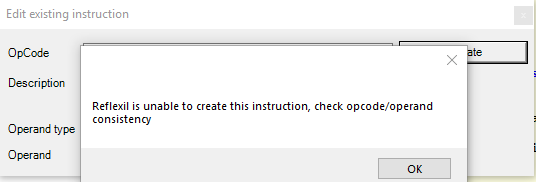
i keep trying to replace lines 128 and 129 but i get this error when trying i am not editing the operand like instructed but i cant make the change
Quote Originally Posted by alancool2 View Post
i keep trying to replace lines 128 and 129 but i get this error when trying

i am not editing the operand like instructed but i cant make the change
I cannot tell you what your exact problem is off only this one picture. From what I can guess, you may be editing the opcode and forgetting to set the operand type to [None].

It should look like this:


Make sure your final result looks like this:

and not this:


My apologies if my original instructions are hard to understand. I can see how they may be confusing, especially if English isn't your native language.

Best,
Sqeegie
Quote Originally Posted by Sqeegie View Post
I cannot tell you what your exact problem is off only this one picture. From what I can guess, you may be editing the opcode and forgetting to set the operand type to [None].

It should look like this:


Make sure your final result looks like this:

and not this:


My apologies if my original instructions are hard to understand. I can see how they may be confusing, especially if English isn't your native language.

Best,
Sqeegie
That was exactly it! Thank you for the help. If anyone posts about the same issue i'll link them to this.
Thank you but can't see last line
Quote Originally Posted by Sqeegie View Post
A list of modification locations for A17 that is mostly accurate.

Code:
Enable instant crafting:
    Location: -/XUiM_Recipes/GetRecipeCraftTime(XUi, Recipe): Single
Best,
Sqeegie
Thank you so much for this information I would never have figured all these out on my own.

The only problem I have is that I don't see anything after the location and can't get Instant crafting to work.
Could you post what the change should be?
Quote Originally Posted by VKurgan View Post
Thank you so much for this information I would never have figured all these out on my own.

The only problem I have is that I don't see anything after the location and can't get Instant crafting to work.
Could you post what the change should be?
Wow, I can't believe I haven't noticed that typo after all this time. Well, the correct modification looks like this:

Code:
Enable instant crafting:
    Location: -/XUiM_Recipes/GetRecipeCraftTime(XUi, Recipe): Single
    Type: ZERO
Cheers!
Sqeegie
Posts 1–15 of 27 · Page 1 of 2
This thread is closed for replies.

Similar Threads

Tags for this Thread

None

Talk with us