Userbar Tutorial
Here it goes:
Ending Result:

1.) open a new 400x20 and be sure you have a white background
2.) take your gradient tool and select the "black to transparent" setting, then click the setting to change its colors, and change to black to a color you want to use as your background fading color...for this userbar i used a light blue.

3.) Add the symbol, icon or image that is being represented by the userbar

4.) now go back to your gradient tool and reselect the Black -> Transparent, but keep the color set to black this time, and make the 2 side fades of black. If you wanna use a lazy way to do this, take your rectangular selection tool, make a new layer, select 1/4 of the left side and fill it with black, then use the magic want to select the non-black areas on that layer, right click the selection, select "feather" and set it to 7-15, then delete a few times and it will fade the box into the background....then duplicate the layer, go into "Edit -> Transform -> Flip Horizontal" then take that layer and move it to the right side and make it look how you want

5.) Now add the text for the **** User, make the text white and use a nice pixel font, i use "Visitor" (you can get it from www.dafont.com) and type out the user text, then right-click the text layer and go into its blending options, select "stroke" from the bottom of the options and make it a 1 px stroke with a color from your userbar that blends nicely (i used the light blue again)

6.) Shine & Border: this is the tricky part, the shine is a bit of a time consuming attribute but the border is easy.
Shine: okk....basically you need to make a new document and make the dimetions the same size as your width for your userbar or signature....mine are usually 400x20 userbars so i would make a 400x400 document.
Delete the background (unless it is already transparent...if not then delete it to make it transparent)
take your rectangular selection tool and select the left part of the document and select around 1/2 of the document.
make a new layer and fill that selection with white so 1/2 the document is white and the other 1/2 is transparent.
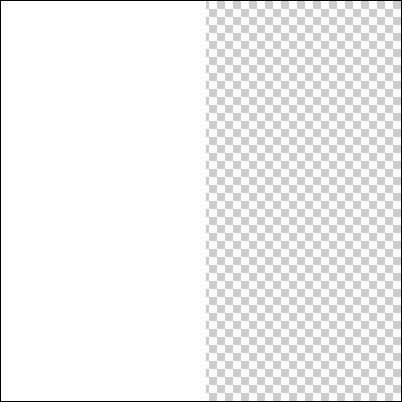
select the layer with the white rectangle and go "filter->distort->shear" and change the line to look like a really thin "S"
THIS IS IS TOO WIDE...YOU NEED TO MAKE YOURS THINNER!!
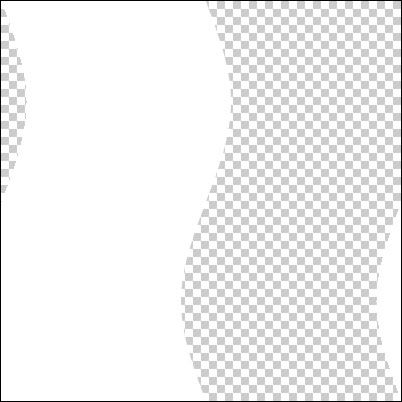
then once it is sheared to look that way...yousimply selectall or ctrl+a, then paste it into your userrbar (ctrl+V) then use ctrl+t to "transform" it, hold shift and rotate it to point the correct way, then place it onto the userbat to look the way you want. Lower opacity and your done
Border: Simply put, you make a new layer, press ctrl+a for "select all" then go into Edit->Stroke and set the color to black and the pixels to 1px then click ok.....DONE, now it should look like our ending product!!
Ending Result:
1.) open a new 400x20 and be sure you have a white background
2.) take your gradient tool and select the "black to transparent" setting, then click the setting to change its colors, and change to black to a color you want to use as your background fading color...for this userbar i used a light blue.
3.) Add the symbol, icon or image that is being represented by the userbar
4.) now go back to your gradient tool and reselect the Black -> Transparent, but keep the color set to black this time, and make the 2 side fades of black. If you wanna use a lazy way to do this, take your rectangular selection tool, make a new layer, select 1/4 of the left side and fill it with black, then use the magic want to select the non-black areas on that layer, right click the selection, select "feather" and set it to 7-15, then delete a few times and it will fade the box into the background....then duplicate the layer, go into "Edit -> Transform -> Flip Horizontal" then take that layer and move it to the right side and make it look how you want
5.) Now add the text for the **** User, make the text white and use a nice pixel font, i use "Visitor" (you can get it from www.dafont.com) and type out the user text, then right-click the text layer and go into its blending options, select "stroke" from the bottom of the options and make it a 1 px stroke with a color from your userbar that blends nicely (i used the light blue again)
6.) Shine & Border: this is the tricky part, the shine is a bit of a time consuming attribute but the border is easy.
Shine: okk....basically you need to make a new document and make the dimetions the same size as your width for your userbar or signature....mine are usually 400x20 userbars so i would make a 400x400 document.
Delete the background (unless it is already transparent...if not then delete it to make it transparent)
take your rectangular selection tool and select the left part of the document and select around 1/2 of the document.
make a new layer and fill that selection with white so 1/2 the document is white and the other 1/2 is transparent.
select the layer with the white rectangle and go "filter->distort->shear" and change the line to look like a really thin "S"
THIS IS IS TOO WIDE...YOU NEED TO MAKE YOURS THINNER!!
then once it is sheared to look that way...yousimply selectall or ctrl+a, then paste it into your userrbar (ctrl+V) then use ctrl+t to "transform" it, hold shift and rotate it to point the correct way, then place it onto the userbat to look the way you want. Lower opacity and your done
Border: Simply put, you make a new layer, press ctrl+a for "select all" then go into Edit->Stroke and set the color to black and the pixels to 1px then click ok.....DONE, now it should look like our ending product!!


