CoolOutdatedXINGCODE BYPASS for INJECTORS

Posts 46–60 of 197 · Page 4 of 14
Now go to "Security" TAB and open it. Click deny access at the top
i cant find deny acces......
Quote Originally Posted by AVA_Hack View Post
Update Hey can you add a note there saying you don't have to restart you computer after doing this you can log off and log on again its easier.
That was the way we tested it, so not sure if that works for me or others.
Quote Originally Posted by Riddick View Post
That was the way we tested it, so not sure if that works for me or others.
Dude just add it please i test it in my 4 laptops.
Hey i don't understand part 6 to 7..idk what to do after disabling xhunter1
Quote Originally Posted by Riddick View Post
This is for 32bit and 64bit to enable injection with undetected injectors once again.

There has been an update from Xingcode that stopped normal injection methods.


Well............ Problem solved!


1. Download Process Hacker 2 from below and extract it to your desktop.
2. Install the programme fully and open it.
3. Go to services and find xhunter in the list.
4. Right click and then go to properties.
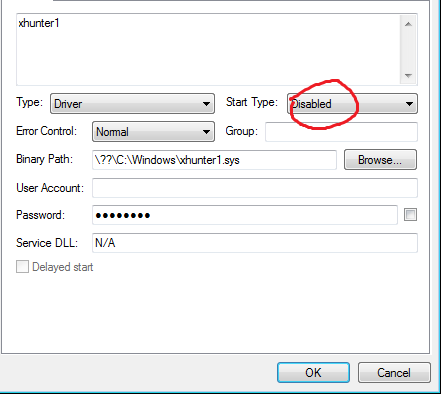
5. Use the dropdown menu on the right to change it to "DISABLED"
6. Now go to "Security" TAB and open it. Click deny access at the top.
7. Now click "Advanced" and open. Remove the bottom 4 (64bit) only with access rights.
8. For 32 bit the bottom 3.
9. CLICK APPLY and xhunter will then disappear.
10. Reboot your system.
11. Open process hacker 2 again and check if it's gone.


Success!!!


Virus Scans;
https://www.virustotal.com/en/file/4...is/1365957306/

Credits: @Riddick @Jabberwock for assistance with this method.

NB: You still need to clean your LOG and XINGCODE files as normal, then re-start your PC to dump the error memory after any 3rd party detections.

This is not a Cheat Engine bypass, and is only for the injection of dll's and the Mini-farmer into the AVA.exe


please help me find xHunter not go to skype and help with teamviewer pls sorry my englisch
Quote Originally Posted by fastgamer91 View Post
please help me find xHunter not go to skype and help with teamviewer pls sorry my englisch
Instruction added to open Process Hacker and click on Services tab and find xhunter.
is there anyway to make the hack kill yourself when in game with mini farmer?
Quote Originally Posted by calvink13 View Post
is there anyway to make the hack kill yourself when in game with mini farmer?
theres an automatic mini farmer somewhere on mpgh you can look for it.

---------- Post added at 01:20 PM ---------- Previous post was at 01:15 PM ----------

Quote Originally Posted by Riddick View Post
In the main RELEASE you will see it. Just follow all the instructions please.
Do you mean the A.V.A hacks place cause i don't know what you mean by the main RELEASE.
Quote Originally Posted by Riddick View Post
Instruction added to open Process Hacker and click on Services tab and find xhunter.

I have but I find nothing
Where are the updated instructions i look at your posts and i cant find it.
Quote Originally Posted by ANguyennnn View Post
Where are the updated instructions i look at your posts and i cant find it.
In the main RELEASE you will see it. Just follow all the instructions please.
Quote Originally Posted by Riddick View Post
In the main RELEASE you will see it. Just follow all the instructions please.
I dont understand the part 6 to 7...i pressed Security tab and theres no "deny access" could you help me please? ty
[QUOTE=Riddick;7933784]
This is for 32bit and 64bit to enable injection with undetected injectors once again.

There has been an update from Xingcode that stopped normal injection methods.


Well............ Problem solved!


1. Download Process Hacker 2 from below and extract it to your desktop.
2. Install the programme fully and open it.
3. Go to the Services tab in Process Hacker and find xhunter in the list.
4. Right click and then go to properties.
5. Use the dropdown menu on the right to change it to "DISABLED"
6. Now go to "Security" TAB and open it. Click deny access at the top.
7. Now click "Advanced" and open. Remove the bottom 4 (64bit) only with access rights.
8. For 32 bit the bottom 3.
9. CLICK APPLY and xhunter will then disappear.
10. Reboot your system.
11. Open process hacker 2 again and check if it's gone.
12. Remember to close Process Hacker again before you try to login.


Success!!!


Virus Scans;
https://www.virustotal.com/en/file/4...is/1365957306/

Credits: @Riddick @Jabberwock for assistance with this method.

NB: You still need to clean your LOG and XINGCODE files as normal, then re-start your PC to dump the error memory after any 3rd party detections.

This is not a Cheat Engine bypass, and is only for the injection of dll's and the Mini-farmer into the AVA.exe


i cant find deny access at the top can u teach me ??
Untitled.png93 KB · 34 downloads Untitled.png112 KB · 29 downloads
THx, but i don't understand "Now click "Advanced" and open. Remove the bottom 4 (64bit) only with access rights." what is bottom4?
Posts 46–60 of 197 · Page 4 of 14
This thread is closed for replies.

Similar Threads

Tags for this Thread

Talk with us