HelpORape not working need help

Posts 14 of 4 · Page 1 of 1
ORape not working need help
So I just downloaded windows 10 and i have orape and everything it works ok. However, when I open the mod it says "d'oh this isn't good An error has occurred: unable to load language" I do not know if I did something wrong. I have been using Orape on windows 7 for a very long time and it has always worked. The only other thing is that I never "downloaded" Orape. I simply put the file on a usb then stuck the usb into my updated computer and went from there. I do not think that would affect anything though. :/ Any ideas or help is greatly apreciated!
Quote Originally Posted by 42champs View Post
So I just downloaded windows 10 and i have orape and everything it works ok. However, when I open the mod it says "d'oh this isn't good An error has occurred: unable to load language" I do not know if I did something wrong. I have been using Orape on windows 7 for a very long time and it has always worked. The only other thing is that I never "downloaded" Orape. I simply put the file on a usb then stuck the usb into my updated computer and went from there. I do not think that would affect anything though. :/ Any ideas or help is greatly apreciated!
u need to add to ur trusted location the swf, or if u use an exe client it just works
Quote Originally Posted by 42champs View Post
So I just downloaded windows 10 and i have orape and everything it works ok. However, when I open the mod it says "d'oh this isn't good An error has occurred: unable to load language" I do not know if I did something wrong. I have been using Orape on windows 7 for a very long time and it has always worked. The only other thing is that I never "downloaded" Orape. I simply put the file on a usb then stuck the usb into my updated computer and went from there. I do not think that would affect anything though. :/ Any ideas or help is greatly apreciated!
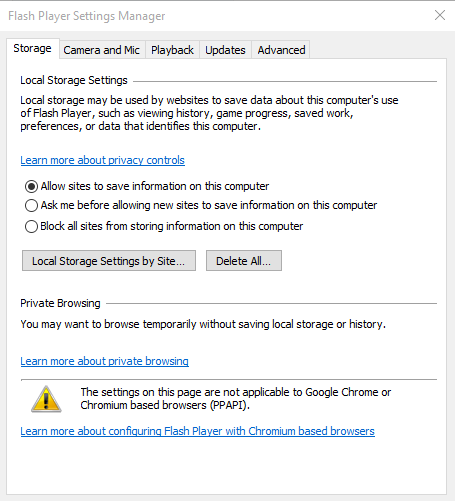
Open the client in flashplayer. Right click somewhere in flashplayer and select "Global Settings" from the dropdown. It'll open a window that looks something like this:

Go to Advanced tab and click "Trusted Location Settings". Add the folder that you have the swf in (EX: The orape folder if you are using client-mod), and close/relaunch the swf. Bam, you should be good to go.
Thank you!! Much appreciated!
Posts 14 of 4 · Page 1 of 1
This thread is closed for replies.

Similar Threads

Tags for this Thread

None

Need help?