Need some laptop help

Posts 1–15 of 20 · Page 1 of 2
Need some laptop help
My laptop is being a complete ass.

I have an USB headset, and I used to plug it into my USB3 port and have no problems.
A few days back I took it out because I had to connect my external HDD to it. When I was done and plugged my headset back in it showed that there was a headset but it refused to play any sound on it.

I plugged my headset into the other USB port and it worked like normal. But now, for some reason, it doesn't do anything in both USB ports (my mouse and everything else I try plugging into the ports work fine).

When I play music it shows that Razer Synapse (I use their surround audio with the headset) is playing sound, but there is no sound comming through my headphones.
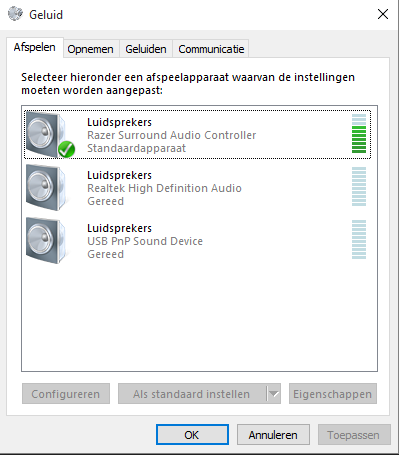

Does anyone know whats wrong?

It also doesn't notice any sound my microphone picks up
Get normal headset.
Your font makes my bowels eject man.
Usually, Razer Surround Audio Controller is for Razer products not anything else, there might be your problem, try to uninstall it and see what happens and oh in a side note, laptop has at least 3-4 usb jacks, depending on a laptop, some have extra in the back.
Did you try enabling other audio speakers listed on that picture? Sometimes it just messes up and you have to enable bunch of shit to find it. If that isn't the problem, right click on the sound options and hit "show disabled devices" try finding your headset. If that doesn't work... Try doing the methods those guys above me told ya.
Quote Originally Posted by Sylar View Post
Get normal headset.
Its not because of the headset, its because of the laptop ._.
Quote Originally Posted by Nightstep View Post
Your font makes my bowels eject man.
Sucks to be you <3
Quote Originally Posted by Venom View Post
Usually, Razer Surround Audio Controller is for Razer products not anything else, there might be your problem, try to uninstall it and see what happens and oh in a side note, laptop has at least 3-4 usb jacks, depending on a laptop, some have extra in the back.
Uninstalled, but no results... And, my laptop only has 2 usb jacks, 2 on the side next to eachother and none on the back
Quote Originally Posted by Hydra View Post
Did you try enabling other audio speakers listed on that picture? Sometimes it just messes up and you have to enable bunch of shit to find it. If that isn't the problem, right click on the sound options and hit "show disabled devices" try finding your headset. If that doesn't work... Try doing the methods those guys above me told ya.
Have tried that many times, but nothing
Quote Originally Posted by WesleyLive0 View Post


Its not because of the headset, its because of the laptop ._.


Sucks to be you <3


Uninstalled, but no results... And, my laptop only has 2 usb jacks, 2 on the side next to eachother and none on the back


Have tried that many times, but nothing
Then you should try to get a USB jack which has more usb ports than one.
Well as an update, there is progress. Last night, suddenly, sound worked again while I was playing LoL and everything was fine again. But this morning it shows I have no sound, when I hover over the sound icon it says "The Audio service is not running" while I do have sound comming from my headphones.

I went to services.msc and checked Windows Audio and it isn't running but I also can't start it. (When right clicking, the start button is greyed out)

Any ideas?
Quote Originally Posted by WesleyLive0 View Post
Well as an update, there is progress. Last night, suddenly, sound worked again while I was playing LoL and everything was fine again. But this morning it shows I have no sound, when I hover over the sound icon it says "The Audio service is not running" while I do have sound comming from my headphones.

I went to services.msc and checked Windows Audio and it isn't running but I also can't start it. (When right clicking, the start button is greyed out)

Any ideas?
All your solutions are just by one click away and a little bit of typing to Google Search; Tips fixing common sound problems or Google Search Ready
Quote Originally Posted by EL Surenzo dA KK Caponeiyl View Post


Try that, while keeping your headset plugged into the USB3 port, uninstall the driver then restart

That was one of the first things I've tried actually, I hoped it would work but nothing.

Quote Originally Posted by Venom View Post


All your solutions are just by one click away and a little bit of typing to Google Search; Tips fixing common sound problems or Google Search Ready
I wouldn't be asking here if I haven't tried nearly all of the things mentioned in the links


Try that, while keeping your headset plugged into the USB3 port, uninstall the driver then restart
So do you NOW have audio or not? Even if you hover over the audio thing in taskbar, you still can right click on it and open a mixer or just simply left click it, I have (X) on it as-well with the audio service is not running, lmao
Quote Originally Posted by Venom View Post
So do you NOW have audio or not? Even if you hover over the audio thing in taskbar, you still can right click on it and open a mixer or just simply left click it, I have (X) on it as-well with the audio service is not running, lmao
Nope, don't have audio
So glad I don't have a Windows anymore. The sound issues with those fuckers are so annoying.
Don't know how to help you tho SRY
Posts 1–15 of 20 · Page 1 of 2

Post a Reply

Similar Threads

Tags for this Thread

None

Talk with us