DIY Laggswitch
Note: There is people below saying this method got them banned, they used third party applications to launch the script, also be very cautious about how much you use the lagg switch and for how extreme of a kill.
Note: You can download the files or use the code, please leave a thanks if this worked for you.
Note: Since this is so simple and uses command prompt rather than an EXE there is less of a chance of this being detected, but to be safe I HIGHLY recommend changing the names of the variables in the code.
Note: This method will not work unless u are using windows firewall to manage your network, if you have disabled it in the past, make sure to enable it so this method will work.
This was thought up while posting information and everything relating to this can be found in THIS thread.
Virus Scans:
https://www.virustotal.com/en/file/a...is/1493183356/
https://virusscan.jotti.org/en-US/fi...job/8p1shniyh3
Howto Use:
- With these batch files you can link them to any keyboard hotkey, if you have a keyboard that can launch programs, u can use it to launch the batch file. Then there is your hotkey for this laggswitch.
You can create a shortcut in windows and give the scripts a shortcut key:
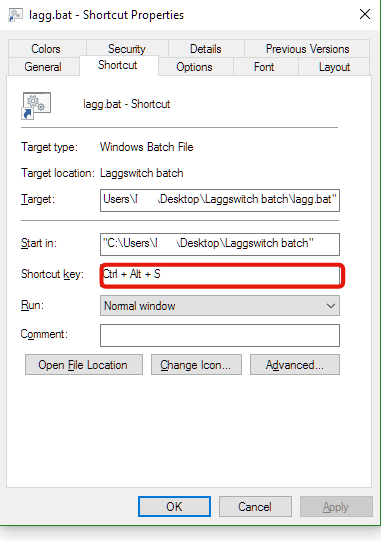
Make sure to run it as administrator (you can do this in the shortcut under the advanced button shown above).
These files are in batch, which means anyone using windows can use and open this source code to view it.
If you are downloading these files just run Prep.bat first, then ur lagg.bat will work
(In the download version, the variables are already called laggggg and penis, i highly recommend changing those to make ur lag switch personal and safe)

Note: You can download the files or use the code, please leave a thanks if this worked for you.
Note: Since this is so simple and uses command prompt rather than an EXE there is less of a chance of this being detected, but to be safe I HIGHLY recommend changing the names of the variables in the code.
Note: This method will not work unless u are using windows firewall to manage your network, if you have disabled it in the past, make sure to enable it so this method will work.
This was thought up while posting information and everything relating to this can be found in THIS thread.
Virus Scans:
https://www.virustotal.com/en/file/a...is/1493183356/
https://virusscan.jotti.org/en-US/fi...job/8p1shniyh3
Howto Use:
- With these batch files you can link them to any keyboard hotkey, if you have a keyboard that can launch programs, u can use it to launch the batch file. Then there is your hotkey for this laggswitch.
You can create a shortcut in windows and give the scripts a shortcut key:
Make sure to run it as administrator (you can do this in the shortcut under the advanced button shown above).
These files are in batch, which means anyone using windows can use and open this source code to view it.
Preperation file:
Code:
@echo off
netsh advfirewall firewall add rule name="CHANGEME" dir="out" action="block" enable="no"
SetX CHANGEME 1
Lagg Switch:
Code:
@echo off
IF "%CHANGEME%"=="2" (
	netsh advfirewall firewall set rule name="CHANGEME" new enable="yes"
	SetX CHANGEME 1
)
IF "%CHANGEME%"=="1" (
	netsh advfirewall firewall set rule name="CHANGEME" new enable="no"
	SetX CHANGEME 2
)
If you are downloading these files just run Prep.bat first, then ur lagg.bat will work
(In the download version, the variables are already called laggggg and penis, i highly recommend changing those to make ur lag switch personal and safe)
 Originally Posted by ffriozi

