OutdatedRazer Double Tac Macro

Posts 115 of 23 · Page 1 of 2
Razer Double Tac Macro
This macro allows you to hold a key down and it keeps switching between your 2 Tactical/Heavy Shotguns.

Step 1:
- Navigate to your macros tab in Razer Synapse > Create and name your macro

Step 2:
- Press no delay > record > now click your designated "shotgun 1 weapon slot" key, then press mouse 1, then shotgun 2 key, then mouse 1 again.

Step 3:
- Add delays as shown:
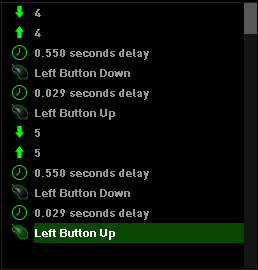
*to do so, press insert > any delay > then move it using the up and down arrows

Step 4:
- Go to your mouse and bind the macro to any key of your choosing (not mouse 1 or 2)

If you don't want to go through the hassle of creating your own macro, I will leave them as downloadable files below.
Rep and thanks are appreciated for more macros.


2xTac_mpgh.net.zip597 B · 174 downloads Clean
//Approved, file seems safe, but haven't been tested ingame.
looks like my logitech macros but for Razer
nice work
Quote Originally Posted by pwxY View Post
looks like my logitech macros but for Razer
nice work
So if I enter these values in the Logitech software, it will work as well? I was having the issue of the first tac shooting then it just keeps on switching between the guns and neither of them shoot at all. Would you be kind enough to share your logitech macros for the double tac/pump? Much appreciated.
Quote Originally Posted by MotherFragger View Post
So if I enter these values in the Logitech software, it will work as well? I was having the issue of the first tac shooting then it just keeps on switching between the guns and neither of them shoot at all. Would you be kind enough to share your logitech macros for the double tac/pump? Much appreciated.
sounds like ur delays are off
Quote Originally Posted by oncagey View Post
sounds like ur delays are off
It's literally the exact same thing as yours though lol, btw does this macro work with tac+heavy or does it have to double tac/heavy
Quote Originally Posted by MotherFragger View Post
It's literally the exact same thing as yours though lol, btw does this macro work with tac+heavy or does it have to double tac/heavy
I'm pretty sure it works with tac and heavy, tac and tac & heavy and heavy. idk 'bout the tac and heavy
Quote Originally Posted by oncagey View Post
I'm pretty sure it works with tac and heavy, tac and tac & heavy and heavy. idk 'bout the tac and heavy
Thanks for the info, my dude.
how did you like make the macro a file? please tell me i'll release a op macro for razer.
Quote Originally Posted by Afizixu View Post
how did you like make the macro a file? please tell me i'll release a op macro for razer.
what macro? hmu on skype, I'll show ya

- - - Updated - - -

Quote Originally Posted by patrickgio View Post
Hey could you make a clip showing how it looks like in game ?
Quote Originally Posted by ff78e5bbfc3a0642 View Post
Same timing works for Logitech ?
It worked once properly and then it stopped working, so weird. Can you test it too and get back to me?
Quote Originally Posted by ff78e5bbfc3a0642 View Post
Same timing works for Logitech ?
Yes same timings, timings don't matter what mouse you have, the timings are based off of how quick u can switch and shoot the shotguns ingame.
Quote Originally Posted by Flarey1 View Post
Yes same timings, timings don't matter what mouse you have, the timings are based off of how quick u can switch and shoot the shotguns ingame.
What should be the delay amount for the "While pressed" option?
Hey could you make a clip showing how it looks like in game ?
Posts 115 of 23 · Page 1 of 2
This thread is closed for replies.

Similar Threads

Tags for this Thread

None

Need help?