Razer Double Tac Macro
This macro allows you to hold a key down and it keeps switching between your 2 Tactical/Heavy Shotguns.
Step 1:
- Navigate to your macros tab in Razer Synapse > Create and name your macro
Step 2:
- Press no delay > record > now click your designated "shotgun 1 weapon slot" key, then press mouse 1, then shotgun 2 key, then mouse 1 again.
Step 3:
- Add delays as shown:
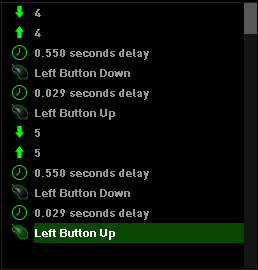
*to do so, press insert > any delay > then move it using the up and down arrows
Step 4:
- Go to your mouse and bind the macro to any key of your choosing (not mouse 1 or 2)
If you don't want to go through the hassle of creating your own macro, I will leave them as downloadable files below.
Rep and thanks are appreciated for more macros.
Step 1:
- Navigate to your macros tab in Razer Synapse > Create and name your macro
Step 2:
- Press no delay > record > now click your designated "shotgun 1 weapon slot" key, then press mouse 1, then shotgun 2 key, then mouse 1 again.
Step 3:
- Add delays as shown:
*to do so, press insert > any delay > then move it using the up and down arrows
Step 4:
- Go to your mouse and bind the macro to any key of your choosing (not mouse 1 or 2)
If you don't want to go through the hassle of creating your own macro, I will leave them as downloadable files below.
Rep and thanks are appreciated for more macros.
https://www.virustotal.com/#/file-an...UyNDU2MjI1Mw==ⓘ
https://virusscan.jotti.org/de-DE/fi...job/ivo8xqr1j9ⓘ
 Originally Posted by pwxY

 hmu on skype, I'll show ya