[Tutorial] How to Create a .BIK video
Hey guys, You all are probably wondering how to make .bik videos. Well, This is going to teach you in Step by Step.
First of all, You need these tools:
Computer
Any type of video [.mp4 .avi .wmv] etc
Rad Video Tools (which is in my Attachments)
Instructions:
Step 1: Download my .zip and Exctract the .exe and install it.. Once it finishes installing, Open it and a menu like this one should pop up.
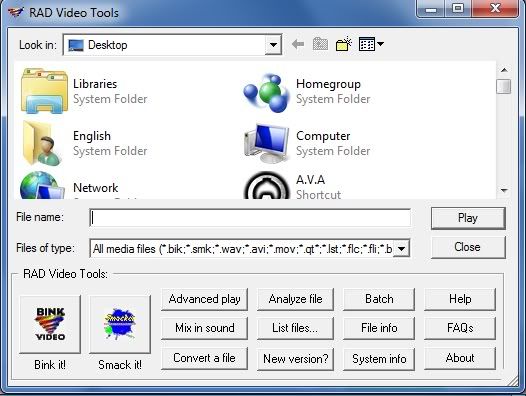
Step 2: Search for that video That you want to turn into a .bik double click on it. Your Video Should Start Playing

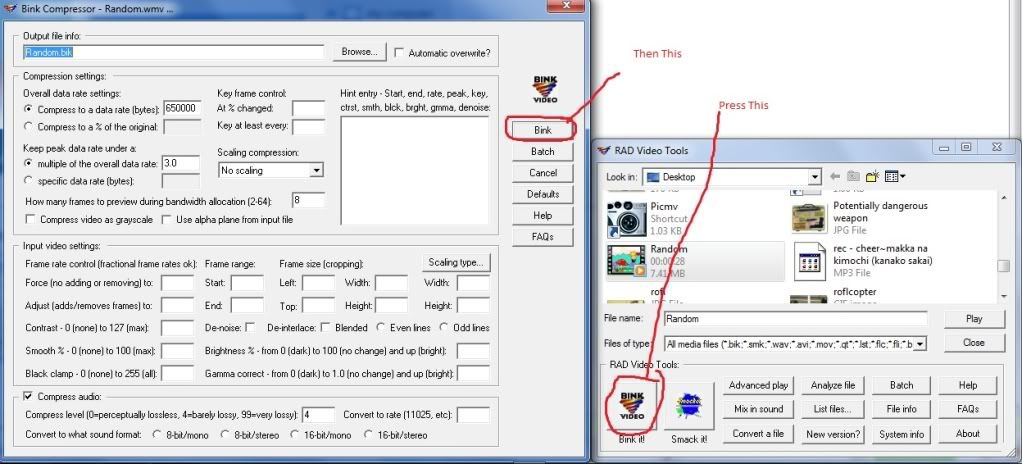
Step 3: Press the button that says "Bink It" And a menu should pop up.. Don't worry about the video stuff and just click on the button that says "Bink".
Step 4: A box should pop up and should have information about how your video is going (Conversion wise)
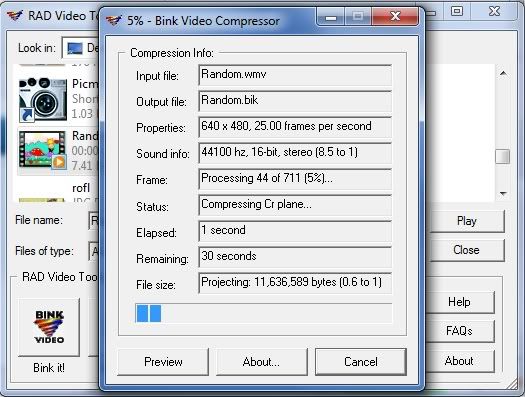
Step 5: You've finished making the Video after pressing the button "Done" Now all you have to do is to find that video and rename it either "calogo" or "nalogo" and put it in "C:/Nexon/Combat Arms/Game/Movies" and you've finished..
VirusScans
VirusTotal
VirusScan
You can have as much time in your video as you want. But I strongly suggest around 7~10 seconds.. any more and the video may start lagging.
Thank you for the time you spent reading this tutorial. Please press the Thank you button (Just under my Post directly on the right) if this has helped you in any way.. Please just don't Read and do nothing.. Comment and tell me if the TUT needs more improving or needs more pictures.
First of all, You need these tools:
Computer
Any type of video [.mp4 .avi .wmv] etc
Rad Video Tools (which is in my Attachments)
Instructions:
Step 1: Download my .zip and Exctract the .exe and install it.. Once it finishes installing, Open it and a menu like this one should pop up.
Step 2: Search for that video That you want to turn into a .bik double click on it. Your Video Should Start Playing
Step 3: Press the button that says "Bink It" And a menu should pop up.. Don't worry about the video stuff and just click on the button that says "Bink".
Step 4: A box should pop up and should have information about how your video is going (Conversion wise)
Step 5: You've finished making the Video after pressing the button "Done" Now all you have to do is to find that video and rename it either "calogo" or "nalogo" and put it in "C:/Nexon/Combat Arms/Game/Movies" and you've finished..
VirusScans
VirusTotal
VirusScan
You can have as much time in your video as you want. But I strongly suggest around 7~10 seconds.. any more and the video may start lagging.
Thank you for the time you spent reading this tutorial. Please press the Thank you button (Just under my Post directly on the right) if this has helped you in any way.. Please just don't Read and do nothing.. Comment and tell me if the TUT needs more improving or needs more pictures.
RADTools.zip
 Originally Posted by Divine