Sleek User Interface - One line of code
User Interface By NextGen1
(also check out my UI components section, http://www.mpgh.net/forum/showthread...66#post1447266 )
I have been getting alot of requests/questions about the user interface of of my software.
In light of this fact , I am writing a as detailed as possible tutorial on what you need, and how to use it (properly)
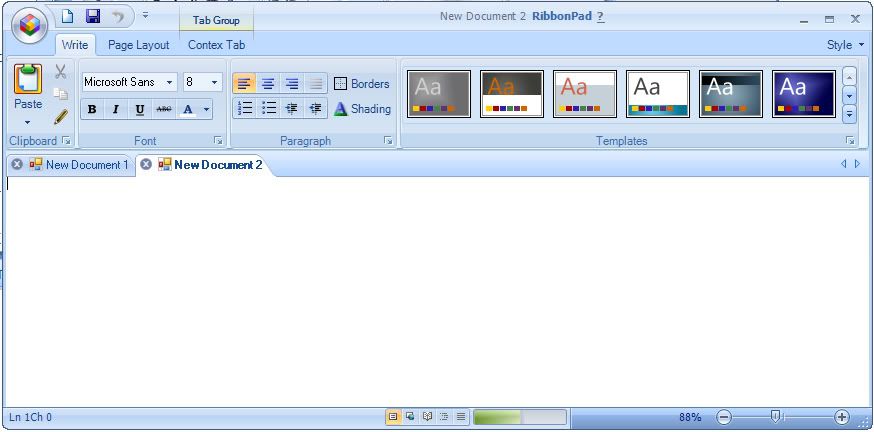
So if your looking to create UI like this
Start Here:
First, You will need to get your hands on a component
One is called dotn*tba*
Note: * used to avoid spiders from locating the file in a search
first * = e
Second * = r
Note: It has become my favorite commercial component, however there are more advanced components like radcontrols which have a few more handy features but require just a little more work and harder to come across without having to spend a lot of money.
Needed File
Virus Scan of Crack (other file 26mb, your call)
or Virus Scan
Note: The reason the file is called "avoidsearch.zip" is for exactly that reason, so anyone searching for the file (like the company who created it, will have a hard time finding it and forcing it's removal)
After you download this item, we need to do a few things.
Step 1 Extract the archive (rar) ( You can use Winrar or 7zip [plus some others])

Step 2 Run DotN*tBa* .Msi (trial version) , Complete Install.
Step 3 after this install has finished Run 2008 Crack Fix
Step 4 Open Vb.net and add the compoent by going to tools --> choose toolbox items --> (wait for it to load possible components....wait some more..)

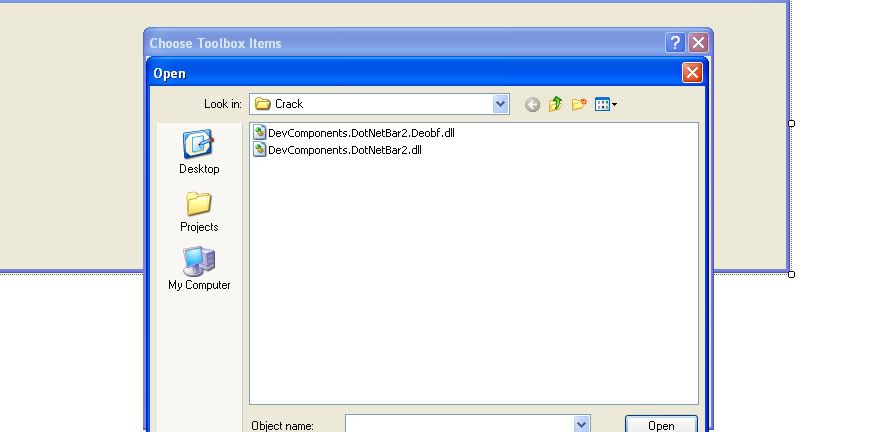
Step 5 Click Browse , goto your install path, Default is Program Files -- > Dotn*tba* for windows forms--> then open the crack folder and choose " DevComponents.DotN*tBa*2" then OK , it will add all of the possible controls to your toolbox
Step 6 Now drag and drop the Ribbon Control anywhere on the form (it will auto dock top)

Step 7 (more of an option, but will make your life alot easier) Goto your forms designer

Note: (if your form designer isn't in the solutions window click , show all button)

then
Step 8 Change This Inherits System.Windows.Forms.Form
to
This Inherits DevComponents.DotN*tBa*.Office2007RibbonForm

What does this do...? Note the image in step 6, the form has both the standard winows border style and the ribbon border style, now it is possible to remove the border yourself add a few tweaks make some sinkable changes, or you can tell the form to inherit the ribboncolntrols theme, what that does is allows you to change one line of code or a property, and once you make the change to Blue, Silver, or Black, the Form will auto inherit it's appearance without the need for a lot of editing and pointless code.
The end result is a sleek looking UI , all you have to do is right click and add buttons, texts, etc. etc.
Note:
the DotN*tba* comes with about 40 other controls, in which case you can still set the designer to inherit the ribbonbarcontrol without placing it on the form, therefor you can skin and theme your component without having to have the ribbonbar (if you choose not to anyway)
End Result = Sexy

So there you have it, I hope this helps, If you need more information, or need some more help, PM me.
(also check out my UI components section, http://www.mpgh.net/forum/showthread...66#post1447266 )
I have been getting alot of requests/questions about the user interface of of my software.
In light of this fact , I am writing a as detailed as possible tutorial on what you need, and how to use it (properly)
So if your looking to create UI like this
Start Here:
First, You will need to get your hands on a component
One is called dotn*tba*
Note: * used to avoid spiders from locating the file in a search
first * = e
Second * = r
Note: It has become my favorite commercial component, however there are more advanced components like radcontrols which have a few more handy features but require just a little more work and harder to come across without having to spend a lot of money.
Needed File
Virus Scan of Crack (other file 26mb, your call)
or Virus Scan
Note: The reason the file is called "avoidsearch.zip" is for exactly that reason, so anyone searching for the file (like the company who created it, will have a hard time finding it and forcing it's removal)
After you download this item, we need to do a few things.
Step 1 Extract the archive (rar) ( You can use Winrar or 7zip [plus some others])
Step 2 Run DotN*tBa* .Msi (trial version) , Complete Install.
Step 3 after this install has finished Run 2008 Crack Fix
Step 4 Open Vb.net and add the compoent by going to tools --> choose toolbox items --> (wait for it to load possible components....wait some more..)
Step 5 Click Browse , goto your install path, Default is Program Files -- > Dotn*tba* for windows forms--> then open the crack folder and choose " DevComponents.DotN*tBa*2" then OK , it will add all of the possible controls to your toolbox
Step 6 Now drag and drop the Ribbon Control anywhere on the form (it will auto dock top)
Step 7 (more of an option, but will make your life alot easier) Goto your forms designer
Note: (if your form designer isn't in the solutions window click , show all button)
then
Step 8 Change This Inherits System.Windows.Forms.Form
to
This Inherits DevComponents.DotN*tBa*.Office2007RibbonForm
What does this do...? Note the image in step 6, the form has both the standard winows border style and the ribbon border style, now it is possible to remove the border yourself add a few tweaks make some sinkable changes, or you can tell the form to inherit the ribboncolntrols theme, what that does is allows you to change one line of code or a property, and once you make the change to Blue, Silver, or Black, the Form will auto inherit it's appearance without the need for a lot of editing and pointless code.
The end result is a sleek looking UI , all you have to do is right click and add buttons, texts, etc. etc.
Note:
the DotN*tba* comes with about 40 other controls, in which case you can still set the designer to inherit the ribbonbarcontrol without placing it on the form, therefor you can skin and theme your component without having to have the ribbonbar (if you choose not to anyway)
End Result = Sexy
So there you have it, I hope this helps, If you need more information, or need some more help, PM me.
 Originally Posted by ac1d_buRn


 just like the one in ca phinisher on the 1st application in download.