Muledump : Tooltips
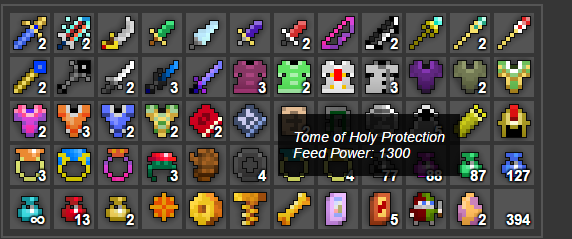
so after I saw @einaras post about his "script to calculate worth" for muledump I was initially going to build on that general idea because I was bored but ended up doing something else instead o.o not sure how I went from making a price thing to a tooltip... but here it is I guess?

Contents:
Add the following 2 files to your muledump\lib\ folder
tooltip.css
tooltips.js
Inside of muledump.html located in your muledump folder, You change the following
To match this
Then... Inside of mule.js located in your muledump\lib\ folder, You change the following variable (marked in bold)
to match the following
And for those who are lazy or doesn't feel like doing it themselves. The files have been attached in the zip file
Virus Scans :
Jotti Malware Scan
VirusTotal
Screenshot
Contents:
- 2 New Files
- 2 File Modification
New Files
Add the following 2 files to your muledump\lib\ folder
tooltip.css
Code:
#tooltip {
  position: absolute;
  float: left;
  max-width: 250px;
  background: rgba(0, 0, 0, 0.8);
  padding: 15px;
  color: #fff;
  font-style: italic;
  font-size: 14px;
  transition: opacity 0.1s;
  text-align: left;
  opacity: 0;
}
Code:
$(function() {

  var toolTips = window.toolTips = {
    timeout: null,
    html: '<div id="tooltip"></div>',

    init: function() {
      $(toolTips.html).appendTo('body');
    },

    show: function() {
      $('#tooltip').css({
        opacity: 0
      });
      clearTimeout(toolTips.timeout);
      $('#tooltip').html($(this).data('tip').replace('\n', '<br/>'));
      var offset = $(this).offset(),
        height = $(this).outerHeight() + 15,
        parWidth = $(this).outerWidth() / 2,
        width = (($('#tooltip').outerWidth()) / 2) - parWidth;

      $('[data-tip]').bind('mousemove', function (e) {
        $('#tooltip').css({
          left: e.pageX + 35,
          top: e.pageY,
          opacity: 1
        });
      });
    },

    hide: function() {
      $('[data-tip]').unbind('mousemove');
      toolTips.timeout = setTimeout(function() {
        $('#tooltip').css({
          opacity: 0
        });
      }, 50);
    }
  }

  toolTips.init();
  $(document).on("mouseenter", ".item[data-tip]:not([data-tip*='empty slot'])", toolTips.show);
  $(document).on("mouseleave", ".item[data-tip]", toolTips.hide);
});
Modification
Inside of muledump.html located in your muledump folder, You change the following
Code:
<script type="application/javascript" src="lib/mule.js"></script>
<script type="application/javascript" src="lib/muledump.js"></script>
<link type="text/css" rel="stylesheet" href="lib/dump.css">
<link type="image/png" rel="shortcut icon" href="lib/favicon.png">
Code:
<script type="application/javascript" src="lib/mule.js"></script>
<script type="application/javascript" src="lib/muledump.js"></script>
<script type="application/javascript" src="lib/tooltips.js"></script>
<link type="text/css" rel="stylesheet" href="lib/dump.css">
<link type="text/css" rel="stylesheet" href="lib/tooltip.css">
<link type="image/png" rel="shortcut icon" href="lib/favicon.png">
Code:
var title = it[0];
if (~it[2] && it[1] != 10 && it[1] != 9) title += ' (T' + it[2] + ')';
if (it[6]) title += '\nFeed Power: ' + it[6]
return $r.attr('title', title)
  .css('background-position', '-' + it[3] + 'px -' + it[4] + 'px')
Code:
var title = it[0];
if (~it[2] && it[1] != 10 && it[1] != 9) title += ' (T' + it[2] + ')';
if (it[6]) title += '\nFeed Power: ' + it[6]
return $r.attr('data-tip', title)
  .css('background-position', '-' + it[3] + 'px -' + it[4] + 'px')
And for those who are lazy or doesn't feel like doing it themselves. The files have been attached in the zip file
Virus Scans :
Jotti Malware Scan
VirusTotal

 Originally Posted by SAOfan2




