using PS3 controller on your PC
turn off your PS3 controll or system
plug in your PS3 sixaxis controller into your PC using a USB cable
extract folder to desktop
run and install libusb-win32-filter-bin-0.1.10.1.exe (no need to run the test)
run ps3sixaxis_en.exe once (your command prompt should pop up for a split second)
push the PS3 button on the controller once
go to control panel go to devices and the ps3 should be there

right click the ps3 controller and click properties
click settings and click calibrate
click next
press any button on your ps3 controller (if this does nothing see notes)
with the left analog stick rotate 360 degrees in both directions (the "x" should be in the middle of the box)

press any button on the ps3 controller
with the right analog stick move left and right a few times
press any button on the ps3 controller
with the right analog stick go up and down a few times
press any button on the ps3 controller
click finish
click apply then ok
install ControlMKv0232.exe
go to C:/Program Files/ ControlMK and run ControlMK.exe
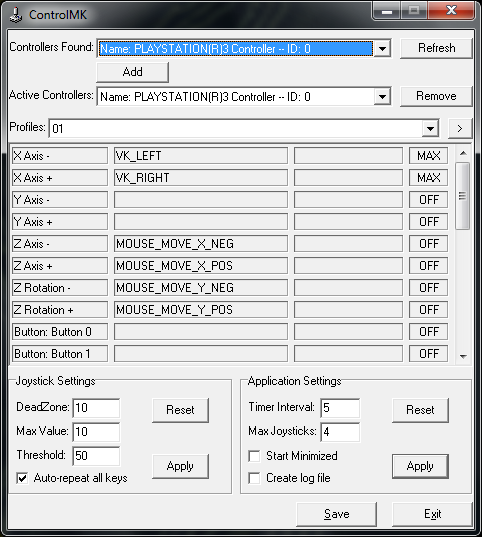
click the drop down menus for controllers found and activate controllers and select your PS3 controller
click the right arrow button next to the profiles drop down menu
click add and name it after the game your setting it up for
now assign the actions you want to the ps3 controller
click the button name to bring up a menu


0 select
1 L3
2 R3
3 start
4 D-pad up
5 D-pad right
6 D-pad down
7 D-pad left
8 L2
9 R2
10 L1
11 R1
12 triangle
13 circle
14 X
15 square
16 PS3 button
(there is no 17 & 18)
after you've assigned the keys save
NOTES
after unplugging the controller or restarting your computer you will most likely have to run ps3sixaxis_en.exe again and recalibrate the controller
with vista and Win7 run as admin
if ps3sixaxis_en.exe doesnt work try this
copy and paste ps3sixaxis_en.exe in c:/Windows/System32
go to start menu and click run
type in CMD click ok and your command prompt will pop up
type in ps3sixaxis_en and press enter
that should work
personal note:
using the PS3 controller on the PC is really only worth it if you play RPG's or RTS's something like that because it really cripples your ability on FPS's
...works on Win7 32bit >.>
Virus scans
Virus Total
VirScan
plug in your PS3 sixaxis controller into your PC using a USB cable
extract folder to desktop
run and install libusb-win32-filter-bin-0.1.10.1.exe (no need to run the test)
run ps3sixaxis_en.exe once (your command prompt should pop up for a split second)
push the PS3 button on the controller once
go to control panel go to devices and the ps3 should be there
right click the ps3 controller and click properties
click settings and click calibrate
click next
press any button on your ps3 controller (if this does nothing see notes)
with the left analog stick rotate 360 degrees in both directions (the "x" should be in the middle of the box)
press any button on the ps3 controller
with the right analog stick move left and right a few times
press any button on the ps3 controller
with the right analog stick go up and down a few times
press any button on the ps3 controller
click finish
click apply then ok
install ControlMKv0232.exe
go to C:/Program Files/ ControlMK and run ControlMK.exe
click the drop down menus for controllers found and activate controllers and select your PS3 controller
click the right arrow button next to the profiles drop down menu
click add and name it after the game your setting it up for
now assign the actions you want to the ps3 controller
click the button name to bring up a menu
0 select
1 L3
2 R3
3 start
4 D-pad up
5 D-pad right
6 D-pad down
7 D-pad left
8 L2
9 R2
10 L1
11 R1
12 triangle
13 circle
14 X
15 square
16 PS3 button
(there is no 17 & 18)
after you've assigned the keys save
NOTES
after unplugging the controller or restarting your computer you will most likely have to run ps3sixaxis_en.exe again and recalibrate the controller
with vista and Win7 run as admin
if ps3sixaxis_en.exe doesnt work try this
copy and paste ps3sixaxis_en.exe in c:/Windows/System32
go to start menu and click run
type in CMD click ok and your command prompt will pop up
type in ps3sixaxis_en and press enter
that should work
personal note:
using the PS3 controller on the PC is really only worth it if you play RPG's or RTS's something like that because it really cripples your ability on FPS's
...works on Win7 32bit >.>
Virus scans
Virus Total
VirScan
Sixaxis.rar

 Originally Posted by Hagerad


