Is it possible to change the script, so that it is suitable for 1600x900 or else?
ShellShock Live - AUTO Aimbot - Weapon Variations - [&Source Code]
How do you manually move the orange dot, how do I use the "manual mode"? The automatic allignment gets too buggy when you're not the host.
just drag the dot with your mouse
 Originally Posted by sNor

Tracer is missing in game for me, tracking works fine dot stays while moving on me, for manual uncheck auto position then drag the dot, would be great if it actually had a tracer.
I've finally found another method that looks promising. I'll be updating within a few days hopefully!
Dope, gl on the update
Update please
İt is not very accurate and pointer is always way too high not on the tank it doesnt auto align also it doesnt show exact route of a shot doesnt work with the bumpers it is useless in modes like rebound.
Can you add a manual box for the wind and factor the wind into the tracer?
The bot dont get the Right Resoultion from my Laptop....
I use 1680x1050 Windowed or Fullscreen make no different.
636311095001368766>> Getting shellshock size
636311095016214583>> Exited for unsupported Width: -7,728,63,1288;1179
636311095016214584>> Exiting
I use 1680x1050 Windowed or Fullscreen make no different.
636311095001368766>> Getting shellshock size
636311095016214583>> Exited for unsupported Width: -7,728,63,1288;1179
636311095016214584>> Exiting
updated the files  .
.
.Wtf.This bot is not working.It doesnt show tracer and auto position.And when i click scan it says something weird.This is broken.
got the ner version with 2 new boxes on the side and nothing works and the readme file tells you nothing and when i do a scan nothing happens
The OP did not get updated at the same time as the files, so I apologize for that.
In the mean time:
1. Join a game
2. To activate the tracker, press the top scan button when your aiming circle is not visible
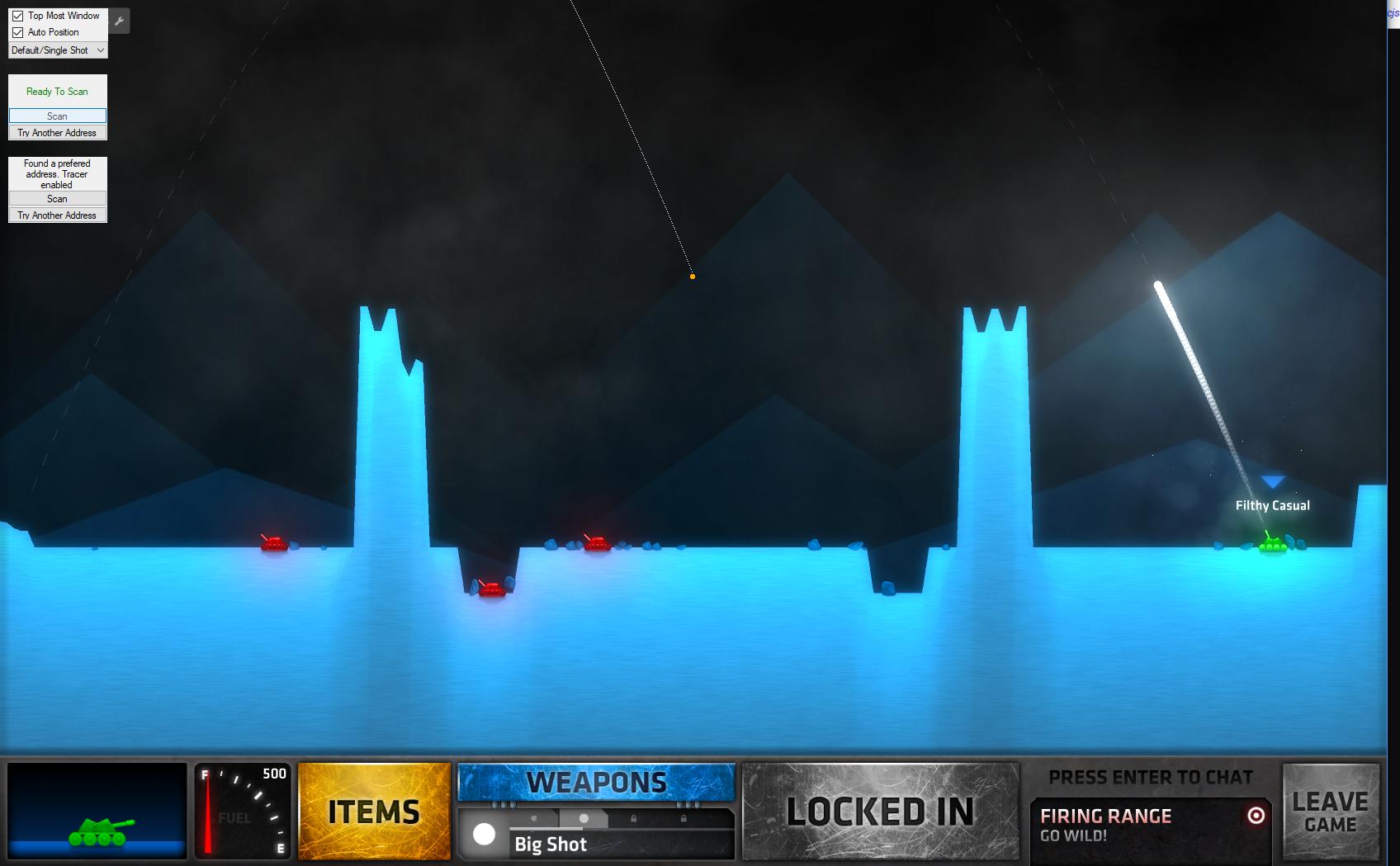

3. To activate the tracer, set your angle to 45 aiming to the left. Set your power to 100 then press the bottom scan button:

I moved the orange dot from the top left corner manually (using the "Auto Position" checkbox option and dragging it) to show the tracer better

4. If either the tracer or tracker are not showing up correctly, press the "Try Another Address" button for whichever is wrong. Do this slowly, if you go too fast you'll have to restart the process again for whichever you pressed.
In the mean time:
1. Join a game
2. To activate the tracker, press the top scan button when your aiming circle is not visible
Tracker Images
3. To activate the tracer, set your angle to 45 aiming to the left. Set your power to 100 then press the bottom scan button:
Tracer Images
I moved the orange dot from the top left corner manually (using the "Auto Position" checkbox option and dragging it) to show the tracer better
4. If either the tracer or tracker are not showing up correctly, press the "Try Another Address" button for whichever is wrong. Do this slowly, if you go too fast you'll have to restart the process again for whichever you pressed.
Similar Threads
Steam Games Hacks & CheatsShellShock Live - Arcer - Ruler-Like Aimbot Tool (+Sources) 41 Steam Games Hacks & CheatsCon's Shell Shock Live Aimbot [Source Code]YA 266 Combat Arms Mod HelpNo one lives forever in the source code and how to adjust the weapon model, display mQ1 0 CrossFire Hack Coding / Programming / Source CodeWeapon Hack Damage source code (All Weapon) 54 Visual Basic Programmingvb AImbot! No tut only source code!
 6
6
54 Visual Basic Programmingvb AImbot! No tut only source code! 6