VB08 MEGA TUT
Made By, SMgamer Please Do Not Leech
Now, First we need to download VB08, Or VB.net. Then you Need to Download PheNix's Module Maker.
Once you Have done all that... Its Time to Open Visual Basic.
Once VB Has Loaded, Go to the Top Left and click, File > New Project
A New Window Should Have appeared. Click on Windows Form Application.
Now After you Clicked Windows Form Application, Give your Hack A Name in the Box Below..
The Whole window Should Change. Your Tool Box Should be to the left and Properties should be on the right..
Your Form will be In the Middle ish Area... Go Ahead and Click the Form.
Then Under The Properties, Scroll Up and down until you See Text, Change that to your Hacks name.
Now, On the left Find and Double-click something that Says.. Button. Button 1 should appear on your Form.
Click the button once then Go to properties, and change the Text to Stamina.
Now, Make another Button. Instead of naming it Stamina Name it Off.
Now Make 12 More Buttons And Name them...
Ammo - Off
Anti-Kick - Off
No Spread - Off
No Recoil - Off
Super Jump - Off
NFD - Off
So your Hack should Look Like this..
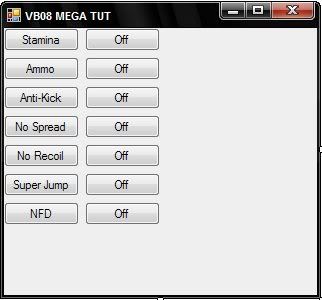
(You Can Move Buttons By Dragging them.)
Now Go to your tool List (on the left), and find Label.
Then double-click it, and Drag to where you Want it. then Put the Credits In.
Example:
 Originally Posted by
It should Look something like this...
Originally Posted by
It should Look something like this...

Now! We have our Form Done.. Time for Coding..
First Lets Add our Module.
Open your Module Maker, and Click Generate Fast Module.
Lots Of Coding Should appear to the right.. Highlight it all and Copy.
Go Back to VB and Go to the Top and Click.. Project > Add Module > Ok
Now you Have Made your Module. You should See..
Then you Add the Code.
Now Click the Form1.vb [Design]* Tab.
Now Find Timer In your tool List. Double Click it.
Now Below Your Form you should see a little Stop Watch. Double-Click It and Add in..
Do you see where it says WriteFloatPointer? Go Back to your Module Maker..
On the left look for WriteFloatPointer, Copy the Code, go Back to VB, and Replace WriteFloatPointer with The Code you copied.
Now Do you see where it Says Player Pointer? Go to Warrock-Hacks, and Get the Addy in the Warrock Discussion page.
And Replace it. Do the Same with the Stamina Offset, but use the Stamina Offset From Warrock-hacks.
Now go back to Form1.vb [Design]* and Double Click Stamina On.
Add in..
This Turns the Stamina Hack on.
Then Double Click the Stamina Off
and add in...
This Turns the Hack off
Now, Move on to Unlimited Ammo.
Make another timer, and Add in..
Replace the NOP, with the NOP code on your module maker.
Now go to Warrock-hacks and Get the U Ammo Addy #1 and Replace the First 3
Then get Addy #2 and Replace the 2nd 3
then Addy #3 and Replace the last 3.
Do the Same thing with the Buttons..
But this time Instead of..
Were gunna use Timer 2, then timer 3, then 4, Ect..
so you would use
Now For Anti-Kick.. Anti-Kick is Different Because instead of using a Timer, you Put the code Strait into the Buttons!
Your done with Anti-Kick!
No Spread
No Recoil
SuperJump
Hotkey = CTRL
No Fall Damage (NFD)
Now You Are Done with your Hack.
To Create your Hack.. Go to the Top of the VB program.. and Click Build > Build (Your Project Name)
Thanks For Reading/Following my Tutorial I Hope this Helps you!
Please do not Post Hate Comments.. This took a long time to make.
If you Use this Tutorial Make sure to put me in the Credits! Or Thank me!
--SMgamer
Now, First we need to download VB08, Or VB.net. Then you Need to Download PheNix's Module Maker.
Once you Have done all that... Its Time to Open Visual Basic.
Once VB Has Loaded, Go to the Top Left and click, File > New Project
A New Window Should Have appeared. Click on Windows Form Application.
Now After you Clicked Windows Form Application, Give your Hack A Name in the Box Below..
The Whole window Should Change. Your Tool Box Should be to the left and Properties should be on the right..
Your Form will be In the Middle ish Area... Go Ahead and Click the Form.
Then Under The Properties, Scroll Up and down until you See Text, Change that to your Hacks name.
Now, On the left Find and Double-click something that Says.. Button. Button 1 should appear on your Form.
Click the button once then Go to properties, and change the Text to Stamina.
Now, Make another Button. Instead of naming it Stamina Name it Off.
Now Make 12 More Buttons And Name them...
Ammo - Off
Anti-Kick - Off
No Spread - Off
No Recoil - Off
Super Jump - Off
NFD - Off
So your Hack should Look Like this..
(You Can Move Buttons By Dragging them.)
Now Go to your tool List (on the left), and find Label.
Then double-click it, and Drag to where you Want it. then Put the Credits In.
Example:
Originally Posted by
Now! We have our Form Done.. Time for Coding..
First Lets Add our Module.
Open your Module Maker, and Click Generate Fast Module.
Lots Of Coding Should appear to the right.. Highlight it all and Copy.
Go Back to VB and Go to the Top and Click.. Project > Add Module > Ok
Now you Have Made your Module. You should See..
Code:
Module Module1

End Module
Code:
Module Module
Add Code Here
End Module
Now Find Timer In your tool List. Double Click it.
Now Below Your Form you should see a little Stop Watch. Double-Click It and Add in..
Code:
WriteFloatPointer(&H Player Pointer, & &H Stamina Offset, 100)
On the left look for WriteFloatPointer, Copy the Code, go Back to VB, and Replace WriteFloatPointer with The Code you copied.
Now Do you see where it Says Player Pointer? Go to Warrock-Hacks, and Get the Addy in the Warrock Discussion page.
And Replace it. Do the Same with the Stamina Offset, but use the Stamina Offset From Warrock-hacks.
Now go back to Form1.vb [Design]* and Double Click Stamina On.
Add in..
Code:
Timer1.Enabled = True
Then Double Click the Stamina Off
and add in...
Code:
Timer1.Enabled = False
Now, Move on to Unlimited Ammo.
Make another timer, and Add in..
Code:
        NOP(&H Unl Ammo 1 adress, &H90)
        NOP(&H Unl Ammo 1 adress + 1, &H90)
        NOP(&H Unl Ammo 1 adress + 2, &H90)

        NOP(&H Unl Ammo 2 adress, &H90)
        NOP(&H Unl Ammo 2 adress + 1, &H90)
        NOP(&H Unl Ammo 2 adress + 2, &H90)

        NOP(&H Unl Ammo 3 adress, &H90)
        NOP(&H Unl Ammo 3 adress + 1, &H90)
        NOP(&H Unl Ammo 3 adress + 2, &H90)
Now go to Warrock-hacks and Get the U Ammo Addy #1 and Replace the First 3
Then get Addy #2 and Replace the 2nd 3
then Addy #3 and Replace the last 3.
Do the Same thing with the Buttons..
But this time Instead of..
Code:
timer1
so you would use
Code:
 On
Timer2.enabled = true

 Off
timer2.enabled = false
Now For Anti-Kick.. Anti-Kick is Different Because instead of using a Timer, you Put the code Strait into the Buttons!
Code:
 On Button
            NOP(&H5058C5, &H90)
            NOP(&H5058C6, &H90)
            NOP(&H5058C7, &H90)
            NOP(&H5058C8, &H90)
            NOP(&H5058C9, &H90)
            NOP(&H5058CA, &H90)

 Off Button
            NOP(&H5058C5, 139)
            NOP(&H5058C6, 133)
            NOP(&H5058C7, 244)
            NOP(&H5058C8, 130)
            NOP(&H5058C9, 5)
            NOP(&H5058CA, 0)
No Spread
Code:
 Timer:
Writememory(&HAddy, 0, 4)
Code:
Button On:
timer3.enabled = true

Button Off:
timer3.enabled = false
No Recoil
Code:
 timer:
   WriteFloatPointer(&H Player Pointer, &HOffset, 0)
   WriteFloatPointer(&H Player Pointer, &HOffset, 0)
   WriteFloatPointer(&H Player Pointer, &HOffset, 0)
Code:
 Button On:
timer4.enabled = true

 Button Off:
timer4.enabled = false
SuperJump
Hotkey = CTRL
Code:
If GetAsyncKeyState(17) Then
          WriteFloatPointer(&H Player Pointer, &HOffset, 1500)
   End If
Code:
 Button On:
timer5.enabled = true

Button Off:
timer5.enabled = false
No Fall Damage (NFD)
Code:
 Timer:
WriteFloatPointer(&H Player Pointer, &HOffset, -2000)
Code:
 Button On:
timer6.enabled = true

Button Off:
timer6.enabled = false
To Create your Hack.. Go to the Top of the VB program.. and Click Build > Build (Your Project Name)
Thanks For Reading/Following my Tutorial I Hope this Helps you!
Please do not Post Hate Comments.. This took a long time to make.
If you Use this Tutorial Make sure to put me in the Credits! Or Thank me!
--SMgamer