[1.7.3]CJB's Mods
REQUIRES MODLOADER. GO HERE TO DOWNLOAD IT. INSTALL MODLOADER BEFORE INSTALLING ANY OF THESE MODS.
Features:
Hardcore mode
More Info
Teleport
Minimap
X-Ray
Cheats
Item Spawner
Mob Filter
Mob Spawner
You can open the settings menu by pressing the default key Y. You are also able to disable the mods you don't wanna use, when you enabled or disabled a mod a restart of Minecraft is required.
Info:
Hardcore
This mod will make life harder in Minecraft. By changing several settings, you can change the difficulty of this mod, for example you can enable hunger and delete world on death. Also this mod will make food items stackable up to 10, just to spare a bit more space in your inventory. There is also an option to lock your settings, this means you can't change the settings anymore. So no more escaping routes.
Settings:
- Difficulty: Off, Peaceful, Easy, Normal, Hard
- Days Till Starvation: Off, 6 Days, 4 Days, 2 Days, 1 Day
- On Death: Respawn, Clear Inventory, Delete World
- Disable Bed: True/False
- Lock Settings: True/False
More Info
This mod will add a clock, day counter, arrow count, light level and many more on your screen . You can change the position or switch between 12h or 24h clock in the settings menu. Also there is a setting to show current FPS.
Settings:
- Seed: World Seed
- 12h Clock: True/False
- Bigger Icons: True/False
- Hide Icons: True/False
- Position: Upper Left, Down Left, Down Right
- Show Day: True/False
- Show Time: True/False
- Show FPS: True/False
- Show LightLevel: True/False
- Show Biome: True/False
- Show Arrow Amount: True/False
- Show Item Damage: True/False
Teleport
This mod is for SSP only. It allows you to save your current location/manual location and teleport you back to it later. You can add unlimited amount of locations.
Default Menu key is G
Minimap
This mod is adds an minimap in the upper right of your screen. The minimap has 4 different zoom levels, show mobs and has an waypoint indicator. You can also switch the minimap between 2 mode, static and rotate, move minimap to the left of right of your screen, show player during smp.
Settings:
- Enabled: True/False
- Zoom: Normal, Small, Smaller or Smallest
- Show Mobs: True or False
- Show Players: True or False
- Show Items: True or False
- Show Coordinates: True / False
- Show Snow: True / False
- Rotate: True/False
- Side: Left/Right
- Square: True/False
- Transparent: True/False
- Show Heightlevel: True/False
- Waypoint Menu Button: Default U
Cheats
This mod will add cheats into the game which can be easily turned on and off in-game.
Settings:
Player
- Infinite Health: You will never die! Huge heights might be a problem though...
- Unbreakable Armor: Armor wont get damaged.
- Infinite Breath: Air? Whats that? I don't need that...
- One Hit Block: Destroy blocks in a single hit
- One Hit Kill: Kill mobs in a single hit
- Unbreakable Items: Items never break
- Infinite Arrows: Shoot unlimited amount of arrows
- No Fall Damage: Take no damage when falling from high height.
- Minecart Control: Control Minecarts on track by using the arrows keys and jump key for instant stop.
- Extended Reach: Allows you to destroy blocks from an insane distance
World
- Instant Furnace: Infinite furnace power and instant cook
- Walk over Soil: You and mobs will never destroy soil when walking over it.
- No Fire Spread: Fires won't spread, but still work on netherrack blocks
Weather
- Always Day
- Always Night
- Rain: True/False
- Thunder: True/False
Fly
- Toggle Flying: Default Key B
- Fly Up Key: Default R
- Fly Down Key: Default F
- Speed Key: Default Left Shift
- Mouse Control: True / False
- Always Speed: True / False
- Speed: 1 to 10
Mob Filter
This mod allows you to choose which mobs/creatures should or shouldn't spawn. So if you are afraid of spiders or creepers, you can now simply prevent them from spawning.
Settings:
Neutral
- Cows
- Chickens
- Pigs
- Sheep
- Wolfs
- Squid
Aggressive
- Slimes
- Spiders
- Creepers
- Zombies
- Skeletons
Nether
- Ghast
- Zombie Pigman
X-Ray
This mod allow you too see through any block which you have set to invisible. Mods works both for SSP and SMP
Settings:
- Toggle X-Ray = X
- Toggle Caves = Z
- Toggle Nightvision = N
- Menu Button = CTRL + X
Mob Spawner
Right-Click a mobspawner to change what mob it should spawn. Also destroying a mob spawner will drop a mob spawner item.
Item Pack
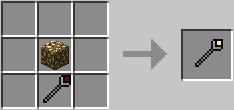
Wrath of Notch | ID's 3920, 3921
This item allows you to cast Lightning bolts from the sky. each item can be used 10 times and is easily recharged.
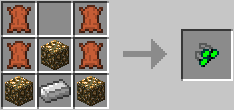
Nightvision Goggles | ID 3922
This item allows you to see better in darkness.
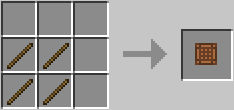
Portable Workbench | ID 3923
This item allows you to use to open a Workbench Gui anywhere when you right-click with item in hand.
Pressure Plate Iron | DEFAULT ID 200
This block will only activate when walked over by player.

Pressure Plate Gold | DEFAULT ID 201
Pressure Plate Gold | DEFAULT ID 201
This block will only activate when walked over by a creature.

Wrath of Notch | ID's 3920, 3921
This item allows you to cast Lightning bolts from the sky. each item can be used 10 times and is easily recharged.
Nightvision Goggles | ID 3922
This item allows you to see better in darkness.
Portable Workbench | ID 3923
This item allows you to use to open a Workbench Gui anywhere when you right-click with item in hand.
Pressure Plate Iron | DEFAULT ID 200
This block will only activate when walked over by player.
Pressure Plate Gold | DEFAULT ID 201
Pressure Plate Gold | DEFAULT ID 201
This block will only activate when walked over by a creature.
Installation
- Download Modloader HERE and install it.
- Take the two folders in the "Put in Minecraft Folder" and put them in the .minecraft folder. Do NOT put the folders inside the bin folder, or inside the minecraft.jar
- Navigate to your minecraft.jar (Instructions for that)
- Open minecraft.jar with an archiver such as 7zip or WinRAR.
- Drag all the class files from inside the "Put in minecraft.jar" folder into the minecraft.jar.
- Make sure the META-INF folder is deleted, as it should already be if you installed Modloader.
- If you are using a 32x32 texture pack, put the files in the "Put in 32x32 Texture Pack" folder into your texture pack's .zip. Do not put them into the .jar or any other folder besides the .zip that has your texture pack in it.
You can also use this video:
Credits
cjbok (CJB)
Scans----
Virustotal 0/43
Jotti 0/20
CJB Mods [1.7.3].zip


 Originally Posted by akachicken2


